
Dash Cam Buying Guide UK: How to Choose the Right Dash Cam
Dash Cam Buying Guide UK: How to Choose the Right Dash Cam
Thinking about buying a dash cam but not sure which features you actually need? With so many models offering 4K resolution, night vision, parking mode, WiFi connectivity and front and rear recording, choosing the right camera can feel more complicated than it should be.
The best dash cam for most UK drivers is one that records reliably, captures clear footage in different lighting conditions and offers the coverage needed for everyday driving. A good 1080p or 2K camera may be perfectly suitable for regular commuting, while a 4K front and rear dash cam can offer additional detail and coverage.
In this UK dash cam buying guide, we’ll explain the main features, compare different types of cameras and help you decide what’s worth paying for. We’ll also cover installation, parking protection, memory cards and UK legal considerations.
If you’re already exploring your options, you can browse the dash cam collection at PYC Online while comparing the features explained below.
What Is a Dash Cam and How Does It Work?
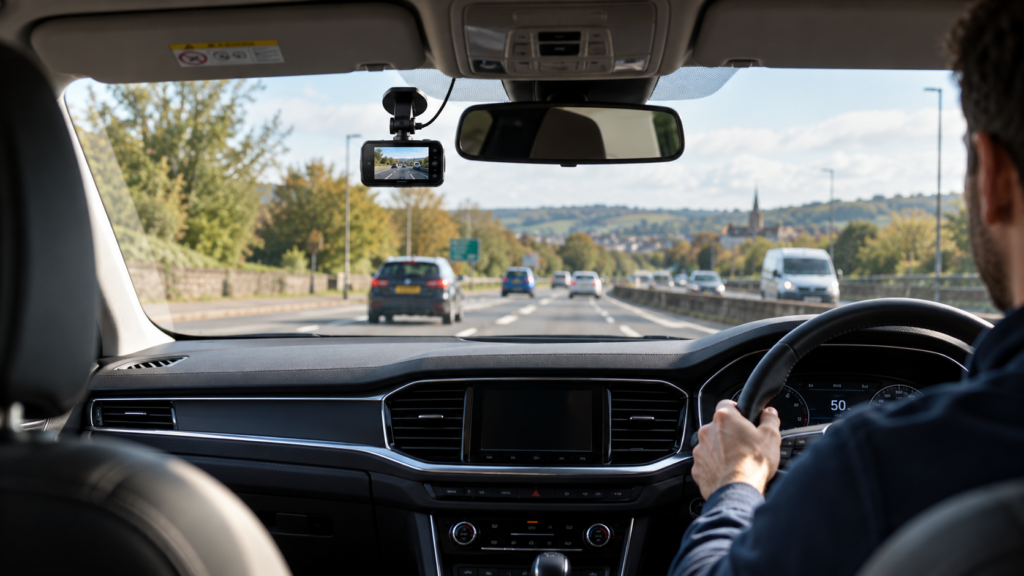
A dash cam is a compact video camera fitted inside a vehicle, usually near the rear-view mirror. It records the road while you’re driving and stores the footage on a memory card.
Most modern dash cams start recording automatically when they receive power and use loop recording. This means that when the memory card becomes full, the camera overwrites the oldest unprotected recordings to make room for new footage.
Many cameras also include a G-sensor, which detects sudden impacts or movements and can protect relevant video files from being overwritten.
Dash cam footage can be useful in several situations:
- Providing evidence after a road traffic accident.
- Recording dangerous driving or unexpected incidents.
- Helping establish what happened during an insurance dispute.
- Capturing incidents involving your parked vehicle, if parking mode is supported.
- Recording journeys for personal reference.
A dash cam cannot prevent an accident or guarantee the outcome of an insurance claim, but clear footage may provide valuable context when events are disputed.
1. Front Dash Cam vs Front and Rear Dash Cam
One of the first decisions when choosing a dash cam is whether you need a single front-facing camera or a dual-camera system.
Front-Facing Dash Cams
A front dash cam records the road ahead of your vehicle. It’s generally the simplest option to install and is often more affordable than a dual-camera setup.
This type of camera can be suitable for everyday commuting, motorway journeys and drivers who primarily want evidence of incidents happening in front of their vehicle.
Front and Rear Dash Cams
A front and rear dash cam uses two cameras to record both directions. The rear camera usually connects to the main unit through a cable.
This provides additional coverage if another driver approaches from behind, follows too closely or collides with the rear of your vehicle.
| Feature | Front Dash Cam | Front and Rear Dash Cam |
|---|---|---|
| Road coverage | Front only | Front and rear |
| Installation | Usually simpler | Additional camera and wiring |
| Cost | Generally lower | Generally higher |
| Storage use | Usually lower | Usually higher |
| Rear incident coverage | Limited | Additional footage |
Our recommendation: A front dash cam may be sufficient for basic recording, but a front and rear system is worth considering if you want additional protection during motorway driving and everyday journeys.
For a more detailed comparison, read our Front vs Front and Rear Dash Cam guide, which explains when a second camera is worth the additional cost.
2. What Dash Cam Resolution Do You Need?
Dash cams are commonly advertised with 1080p, 2K or 4K recording. These numbers describe video resolution, but they don’t tell you everything about image quality.
1080p Full HD Dash Cams
1080p cameras record at a resolution of 1920 × 1080 pixels. They can provide useful footage in good lighting conditions and are often suitable for drivers looking for a basic, affordable camera.
However, number plates and small details can be harder to read at greater distances, particularly in poor lighting.
2K Dash Cams
Many 2K dash cams use 2560 × 1440 resolution, often described as 1440p or QHD. Compared with 1080p, this provides more image detail and may improve the visibility of road signs and vehicle number plates.
For many drivers, a good 1440p dash cam offers a sensible balance between recording quality, file size and price.
4K Ultra HD Dash Cams
A 4K dash cam typically records at 3840 × 2160 resolution. The higher pixel count can capture more detail and allow greater flexibility when reviewing or cropping footage.
However, the actual result depends on the camera’s sensor, lens, processing, compression and recording conditions. A poorly designed 4K camera can perform worse than a good 2K model.
| Resolution | Typical Pixels | Best Suited For |
|---|---|---|
| 1080p Full HD | 1920 × 1080 | Basic everyday recording |
| 2K / 1440p | 2560 × 1440 | Balanced detail and storage |
| 4K Ultra HD | 3840 × 2160 | Higher-detail recording |
Resolution matters, but it should never be the only reason for choosing a camera.
Our full 1080p vs 2K vs 4K Dash Cam comparison explains the differences in image quality, storage requirements and everyday usefulness.
3. How Important Is Dash Cam Night Vision?
Night-time recording is particularly important for UK drivers who travel early in the morning, commute after dark or regularly drive on poorly lit roads.
When choosing a dash cam with night vision, look beyond the advertised resolution.
Useful features include:
- Low-light image sensors: Designed to capture more usable detail when lighting is limited.
- Wide Dynamic Range (WDR): Can help balance brighter and darker areas of an image.
- High Dynamic Range (HDR): May improve detail when the scene contains strong differences in brightness.
- Good lens quality: Helps maintain image clarity across different lighting conditions.
- Glare control: Important when recording headlights, illuminated signs and reflective number plates.
Remember that no dash cam can guarantee readable number plates in every situation. Vehicle speed, weather, lighting, distance and camera movement all affect the final recording.
Whenever possible, compare genuine sample footage taken at night rather than relying entirely on product marketing claims.
4. What Is Dash Cam Parking Mode?
Parking mode allows certain dash cams to monitor your vehicle while the engine is switched off.
This feature can be useful if you regularly leave your car parked on the street, in public car parks or in places where minor bumps and damage may happen without a witness.
Different cameras offer different parking monitoring methods.
Impact Detection
The camera responds to a detected impact or vibration. Depending on the system, it may start recording or protect footage already captured.
Motion Detection
The camera records when movement is detected within its field of view. This may capture activity near your vehicle, although sensitivity and performance vary.
Time-Lapse Recording
The camera captures frames at intervals to reduce storage requirements during extended parking periods.
Continuous Low-Bitrate Recording
Some cameras offer continuous parking surveillance using reduced video data rates.
Important: Parking mode may require a compatible hardwire kit or external power source. A camera advertised as supporting 24-hour parking monitoring does not necessarily record continuously for 24 hours under all conditions.
Find out how these systems work in our Dash Cam Parking Mode Explained guide.
5. Do You Need a WiFi or Wireless Dash Cam?
The term “wireless dash cam” can be misleading because it often refers to wireless data transfer rather than wireless power.
Most dash cams still require a power cable, even when they have built-in WiFi.
WiFi-enabled dash cams allow you to connect a compatible smartphone directly to the camera. Depending on the model and app, you may be able to:
- Preview recorded footage.
- Download videos to your phone.
- Adjust recording settings.
- View a live camera preview.
- Update camera firmware.
WiFi connectivity does not automatically provide internet-based remote monitoring. Many dash cams use a local WiFi connection that only works when your smartphone is close to the camera.
Another important distinction is that a wireless connection doesn’t remove the need for installation cables. Even models offering smartphone access usually require a power supply.
Read Wireless Dash Cams Explained: WiFi, Power Cables and Installation to understand the differences before purchasing.
6. Do You Need GPS in a Dash Cam?
GPS is another feature worth considering, particularly if you regularly travel long distances or want additional information alongside your recordings.
Depending on the model, GPS can record:
- Your vehicle’s location.
- The route travelled.
- GPS-derived speed information.
- Location-related timestamps.
This information may provide useful context when reviewing a journey or road incident.
However, GPS does not improve video quality, and recorded speed data may not always be perfectly accurate.
Some dash cams include built-in GPS, while others need an optional external GPS module. Always check the selected package before ordering.
7. How Do You Power a Dash Cam?
Most dash cams are powered either through a vehicle accessory socket, a suitable USB power connection or a dedicated hardwire installation.
Plug-In Dash Cam Installation
A plug-in installation is generally the simplest solution. The camera receives power through a compatible vehicle socket or USB supply.
In many vehicles, the camera starts when the ignition is switched on and stops when the power supply turns off.
However, some vehicles keep accessory sockets powered even after the engine is stopped, so behaviour depends on the car.
Hardwired Dash Cam Installation
Hardwiring connects the dash cam to the vehicle’s electrical system using a compatible installation kit.
This can provide a tidier installation, reduce visible cables and enable parking monitoring where supported.
Some hardwire kits include low-voltage protection designed to disconnect the camera before the vehicle battery becomes excessively discharged.
Electrical compatibility and correct fuse connections are essential. If you’re not experienced with vehicle electrics, professional installation is advisable.
Not everyone needs hardwiring. Our guide Dash Cam Without Hardwiring: How Can You Power It? explains the available options and their limitations.
8. Can a Dash Cam Drain Your Car Battery?
A dash cam can drain a vehicle battery if it continues drawing power while the engine is switched off.
The risk depends on how the camera is powered, how long it operates, the health of the vehicle battery and the camera’s power consumption.
Parking mode is particularly relevant because some monitoring systems need continuous electrical power.
To help reduce the risk of a flat battery:
- Use a compatible hardwire kit with appropriate low-voltage protection.
- Check whether your vehicle’s accessory socket remains powered when parked.
- Review the dash cam’s parking recording settings.
- Consider a suitable dedicated dash cam battery where compatible.
- Be cautious with extended parking surveillance during cold weather or when your vehicle battery is ageing.
If parking protection is one of your main reasons for buying a camera, read our Dash Cam for Parking Protection guide before choosing a model.
9. What SD Card Does a Dash Cam Need?
Most dash cams save recordings to microSD memory cards. Because cameras continuously write and overwrite video files, choosing a suitable card is important.
A high-endurance microSD card designed for repeated video recording is often preferable to a basic card intended for occasional file storage.
When selecting a card, check:
- The maximum storage capacity supported by the camera.
- The manufacturer’s recommended speed class.
- Compatibility with continuous video recording.
- Whether the camera supports 64GB, 128GB, 256GB or larger capacities.
- Whether the card should be formatted using the camera’s own menu.
A 64GB or 128GB card can be practical for many drivers, but actual recording time depends on resolution, bit rate, compression and the number of recording channels.
For example, a dual-camera 4K system can use considerably more storage than a single 1080p camera.
For more advice, read What SD Card Do You Need for a Dash Cam?.
10. Are Dash Cams Legal in the UK?
Yes. Dash cams are generally legal to use on public roads in the UK, provided they are installed and used appropriately.
The camera must not obstruct the driver’s view of the road or interfere with the safe operation of the vehicle.
Footage may be useful for insurance claims or reporting certain incidents, but recording and sharing identifiable footage can raise privacy and data protection questions depending on the circumstances.
Drivers should also think carefully about audio recording, particularly when passengers may be having private conversations.
Can You Use a UK Dash Cam When Driving in Europe?
Rules vary between European countries. Some countries have different restrictions involving camera use, privacy, recording and publication of footage.
Even if your dash cam is legal in the UK, you should not assume you can use it in exactly the same way everywhere else.
For information about driving abroad, read our Are Dash Cams Legal in the UK and Europe? Rules for Driving Abroad guide.
11. Which Dash Cam Should You Choose?
The right dash cam depends on your driving habits, where you park and how much coverage you want.
| Your Needs | Features to Consider |
|---|---|
| Everyday commuting | Reliable 1080p or 2K recording |
| Motorway driving | Clear image detail and optional rear recording |
| Driving after dark | Strong low-light performance and HDR/WDR |
| Street or public parking | Parking mode and compatible power supply |
| Reviewing footage on your phone | WiFi connectivity and a compatible app |
| Recording long journeys | GPS, reliable loop recording and suitable storage |
| Additional coverage | Front and rear or multi-channel recording |
There is no single dash cam that is best for every driver.
If you want a simple way to record journeys, a reliable front-facing camera may be sufficient. If you regularly use motorways, leave your vehicle parked in public places or want broader coverage, a front and rear system with parking features may be worth considering.
Compare the available dash cams at PYC Online to explore different resolutions, camera configurations and recording features.
Dash Cam Buying Checklist
Before buying a dash cam in the UK, make sure you can answer these questions:
- Do I need a front camera only or front and rear recording?
- Is 1080p sufficient, or would I benefit from 2K or 4K?
- How well does the camera record at night?
- Do I need parking monitoring while the vehicle is switched off?
- Will the camera need hardwiring?
- Does it support WiFi and smartphone access?
- Is GPS included or optional?
- What memory card type and capacity does it support?
- Are all required installation accessories included?
- Will the camera fit safely without obstructing my view?
Checking these points before purchasing can help you avoid paying for unnecessary features or discovering that an important accessory is missing.
Frequently Asked Questions About Dash Cams
Is a dash cam worth buying in the UK?
For many drivers, yes. A dash cam can provide video evidence of road incidents, which may help with insurance disputes or establishing what happened during an accident. However, it does not guarantee a particular legal or insurance outcome.
Is a 4K dash cam better than a 1080p dash cam?
A genuine 4K dash cam has a higher pixel resolution and may capture more detail. However, sensor quality, lens performance, lighting and video processing also affect recording quality. A good 1080p camera can outperform a poor-quality 4K model.
Do dash cams record all the time?
Most dash cams record continuously while powered during a journey. Some also offer parking recording when the vehicle is switched off, provided a suitable power supply and compatible settings are available.
Can dash cams record number plates at night?
Some cameras can capture readable number plates at night, but success depends on distance, speed, lighting, weather and image quality. No dash cam can guarantee readable plates in every situation.
Do I need WiFi for a dash cam?
No. A dash cam can usually record footage without WiFi. WiFi mainly provides convenient access to recordings and settings through a compatible smartphone app.
Can a dash cam work without hardwiring?
Yes. Many dash cams can be powered through a suitable vehicle accessory socket or USB supply. Hardwiring is generally optional for normal driving recording but may be needed for particular parking features.
Does a dash cam need a memory card?
Most dash cams use a microSD card for video storage. Some packages include a card, while others require one to be purchased separately. Check the supported capacity and speed requirements.
Can dash cam footage be used by UK insurance companies?
Yes. Insurers may consider relevant dash cam footage when assessing a claim. The footage should be authentic, clear and relevant to the incident.
Explore More Dash Cam Buying Guides
Want to understand a particular feature in more detail? Our Knowledge Hub includes dedicated guides to help you compare dash cams, understand installation options and choose the right equipment.
- Front vs Front and Rear Dash Cam: Is a Rear Camera Worth It?
- Do Dash Cams Record When the Car Is Off? Parking Mode Explained
- Wireless Dash Cams Explained: WiFi, Power Cables and Installation
- 1080p vs 2K vs 4K Dash Cams: Is 4K Really Worth It?
- Dash Cam Without Hardwiring: How Can You Power It?
- Dash Cam for Parking Protection: What Features Do You Need?
- What SD Card Do You Need for a Dash Cam?
- Are Dash Cams Legal in the UK and Europe? Rules for Driving Abroad
Final Thoughts: Choosing the Right Dash Cam
A good dash cam should be reliable, easy to use and capable of recording useful footage when you need it.
Rather than choosing the highest advertised resolution or the longest feature list, think about the situations in which you would actually use the camera.
For everyday driving, reliable recording and clear image quality are often the most important features. For drivers who regularly park on busy streets or want additional protection, front and rear recording and parking monitoring may offer greater peace of mind.
Once you understand the differences between resolution, night vision, WiFi, GPS and installation options, choosing a dash cam becomes much easier.
Ready to compare your options? Explore our Dashcam collection at PYC Online, or discover more practical buying advice in our Knowledge Hub.
Leave a comment