
Do Dash Cams Record When the Car Is Off? Parking Mode Explained
Do Dash Cams Record When the Car Is Off? Parking Mode Explained
You’ve popped into the supermarket for twenty minutes, come back to your car and spotted a fresh scratch on the bumper. No note, no witnesses and, rather conveniently, no sign of whoever caused it.
It’s exactly the sort of situation that makes you wonder: wouldn’t it be useful if your dash cam kept an eye on the car while you were away?
Well, some can. But there’s a catch.
Yes, certain dash cams can record when the car is switched off, but they need a feature called parking mode and a suitable power source. Simply owning a dash cam doesn’t mean it will continue recording after you’ve taken the keys out.
And despite what some product descriptions suggest, “24-hour parking monitoring” doesn’t always mean the camera is filming continuously for 24 hours.
Let’s look at what actually happens when you switch off the engine, how parking mode works and what you need to make it useful without waking up to a flat car battery.
If you’re still deciding which camera to buy, our Dash Cam Buying Guide UK explains the main features worth considering before spending your money.
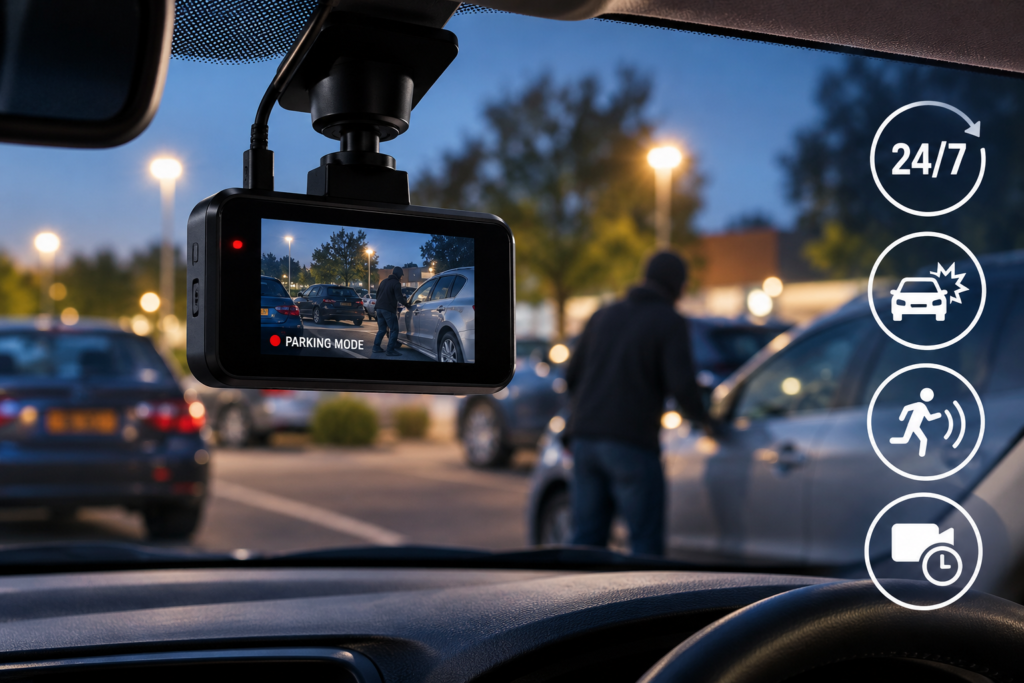
What Happens to a Dash Cam When You Turn Off the Engine?
With a typical plug-in installation, your dash cam receives power from the car’s 12V accessory socket or a compatible USB connection.
In many vehicles, that socket stops supplying electricity when the ignition is switched off. The camera loses power, saves its final recording if designed to do so, and shuts down.
So if someone reverses into your bumper two hours later, there’s a good chance your camera won’t have recorded anything.
However, there’s another possibility. Some cars have accessory sockets that remain powered even when they’re parked. In that case, a connected dash cam may continue operating.
That sounds useful, but it creates two questions:
- Is the camera actually operating in a dedicated parking mode, or is it simply continuing normal recording?
- What is stopping it from draining the vehicle’s battery?
These are important distinctions. On some models, a permanently powered accessory socket won’t activate parking mode at all because the camera needs a separate ignition signal to recognise that the vehicle is parked.
The key point: Having power after the ignition is off is not the same as having properly configured parking surveillance.
What Is Dash Cam Parking Mode?
Parking mode is a feature that allows a compatible dash cam to monitor your vehicle when you’re not driving.
Depending on the model, it might watch for movement, detect impacts or record footage at a reduced frame rate to save storage space.
Think of it as an extra pair of eyes on your parked car, although not quite the all-seeing security guard some advertisements make it sound like.
Parking mode can be particularly useful if you regularly leave your vehicle:
- On a residential street.
- In supermarket or shopping centre car parks.
- In a workplace car park.
- In public parking spaces where vehicles manoeuvre close together.
- In places where accidental damage may go unnoticed.
But the way a camera monitors the vehicle makes a big difference. There are several types of parking mode, and they don’t all capture the same events.
1. Impact Detection: What Happens If Someone Hits Your Parked Car?
Impact detection is one of the most common parking mode features.
A built-in G-sensor detects sudden physical movement or vibration. If another vehicle bumps into your car, the sensor may trigger a recording or protect an existing recording from being overwritten.
For example, imagine someone reversing into your parked car while you’re inside a shop.
With a compatible impact-triggered parking mode, the dash cam may wake up and start recording after detecting the collision.
That sounds ideal, but there’s something worth knowing.
A camera that only wakes up after an impact might miss the moments leading up to it. You may capture a vehicle driving away, but not necessarily the actual contact.
Some systems can save footage from before the trigger because they maintain a temporary recording buffer. Others only start filming once the sensor has reacted.
That’s why two cameras advertising “impact detection” can perform very differently in practice.
What Is Buffered Parking Recording?
Buffered recording means the dash cam temporarily keeps recent footage in memory while monitoring the vehicle.
When an event triggers recording, a compatible system can save footage from before the event as well as afterwards.
For example, instead of seeing only the aftermath of someone hitting your car, you might also capture the vehicle approaching.
The amount of pre-event footage varies by model, and not every parking camera supports buffering.
If identifying what happened before an impact matters to you, this feature is worth checking in the specifications.
2. Motion Detection: Can a Dash Cam Record Someone Approaching Your Car?
Motion detection works differently from impact detection.
Instead of waiting for the vehicle to be bumped, the camera reacts to movement within its field of view.
Depending on the system, it might start recording when another car passes nearby or someone walks in front of the vehicle.
This sounds particularly useful in busy car parks. If somebody approaches your car before damaging it, motion detection may capture more of the incident than impact-only recording.
However, it’s not perfect.
A camera doesn’t necessarily know the difference between someone approaching your vehicle suspiciously and a perfectly innocent person walking past with their shopping.
In a busy location, frequent movement can trigger numerous recordings, potentially increasing power consumption and storage use.
There’s also the issue of sensitivity. Set it too low and the camera may miss relevant movement. Set it too high and you could end up recording every passing car, pedestrian or moving shadow.
Motion detection is useful, but it needs suitable settings and shouldn’t be treated as a guarantee that every incident will be captured.
3. Time-Lapse Parking Mode: Recording Without Huge Video Files
Some dash cams offer time-lapse recording while the vehicle is parked.
Instead of capturing video at the normal frame rate used during driving, the camera records fewer frames per second.
When played back, the recording shows events happening more quickly than in real time.
This can reduce storage requirements compared with normal high-frame-rate recording, depending on how the camera is configured.
Time-lapse is useful when you want an overview of activity around your vehicle over an extended period.
However, because fewer frames are recorded, brief events may be harder to examine in detail. You might see a car approaching and leaving, but miss a split-second moment that a normal recording would have captured.
Some systems combine time-lapse recording with impact detection, switching to or saving a more detailed event recording when a collision is detected.
Always check the specific camera’s behaviour rather than assuming every time-lapse system works this way.
4. Continuous and Low-Bitrate Parking Recording
Other dash cams offer continuous surveillance while parked, sometimes using a lower video bit rate to reduce file sizes.
Unlike an impact-only system, the camera is actively recording rather than waiting for a particular event.
This can give you a more complete record of activity around the vehicle, although recording still depends on available power, storage and the camera’s operating limits.
Low-bitrate recording may use less storage than normal high-quality recording, but the camera still needs electricity to operate.
And that’s where battery protection becomes particularly important.
Which Parking Mode Is Best?
There isn’t one answer for every driver. What matters is the kind of incident you’re trying to capture.
| Parking Mode | How It Works | Main Limitation |
|---|---|---|
| Impact Detection | Responds to bumps or physical movement | May miss what happened before an impact |
| Buffered Impact Recording | Can save footage from before and after a trigger | Not available on every model |
| Motion Detection | Responds to movement in the camera’s view | Can create unnecessary recordings |
| Time-Lapse | Records fewer frames over a period | May miss brief details |
| Continuous Low-Bitrate | Records continuously using reduced video data | Requires an ongoing power supply |
For a car that spends most of its time on a quiet driveway, impact-triggered recording might be sufficient.
For someone regularly parking on a busy street, buffered recording or a more comprehensive parking monitoring system may be worth considering.
We’ll explore the differences in more detail in our Dash Cam for Parking Protection guide.
Do You Need to Hardwire a Dash Cam for Parking Mode?
Here’s where things become a little less straightforward.
Many dash cams can be installed simply by plugging them into the car’s accessory socket. That’s convenient for recording journeys, but it doesn’t necessarily provide the correct power arrangement for parking surveillance.
Some cameras require a dedicated hardwire kit, while others support compatible OBD-II power adapters or external dash cam battery packs.
Option 1: Hardwire Kit
A hardwire kit connects the camera to the vehicle’s electrical system, usually through the fuse box.
Depending on the design, it can provide permanent power while also detecting when the ignition is switched off, allowing the camera to change into parking mode.
A suitable kit may include a low-voltage cut-off, designed to disconnect the camera when the vehicle battery reaches a selected threshold.
Hardwiring can also make the installation tidier because the power cable can be concealed.
However, it must be installed correctly. Vehicle electrical systems vary, and careless wiring can interfere with safety equipment or damage components.
If you’re unfamiliar with automotive electrics, professional installation is the safer option.
Option 2: Compatible OBD-II Power Adapter
Some manufacturers offer OBD-II power adapters designed to provide the necessary power and ignition information for parking mode.
These can avoid a direct fuse-box installation, but compatibility depends on both the vehicle and the dash cam.
Not every OBD-II adapter supports parking surveillance, so don’t assume that a generic plug-in adapter will do the job.
Option 3: Dedicated Dash Cam Battery Pack
An external battery pack can power a compatible dash cam while the vehicle is parked.
These systems are generally designed to charge while the vehicle is running, then supply power to the camera after the engine is switched off.
This may be particularly useful if you want parking monitoring without relying directly on the vehicle’s starter battery for the entire parked period.
The trade-off is additional cost, installation complexity and a finite recording duration.
Option 4: Built-In Battery
Some cameras contain a small internal battery, but that doesn’t mean they can necessarily record for hours while parked.
In many dash cams, an internal battery or supercapacitor mainly supports safe shutdown or saving the final recording.
A supercapacitor is not intended to function like a large rechargeable battery supplying hours of surveillance power.
For a fuller explanation of powering a camera without a permanent fuse-box connection, read Dash Cam Without Hardwiring: How Can You Power It?.
Can Parking Mode Drain Your Car Battery?
Yes, and this is probably the most important thing to understand before leaving a camera recording overnight.
A car battery isn’t an unlimited power supply. When the engine is switched off, anything drawing electricity uses some of the available stored energy.
If a dash cam continues operating for long enough, particularly when the battery is already weak, it can contribute to a flat battery.
And discovering that your camera has been diligently watching the car all night while the car itself now refuses to start is hardly the outcome you were hoping for.
How Does Low-Voltage Protection Work?
Some dash cams and hardwire kits monitor the vehicle battery’s voltage.
When the voltage drops to a configured level, the system shuts off the camera to reduce further discharge.
The appropriate threshold depends on the system, vehicle and battery. It’s not a setting to choose at random simply because a lower number might provide longer recording time.
In fact, setting the cut-off too low may leave insufficient energy to start the engine, especially in cold weather.
Battery protection helps manage risk, but it doesn’t guarantee that your vehicle will start in every situation. Battery condition, temperature and other electrical loads still matter.
What Else Affects Battery Drain?
- The camera’s actual power consumption.
- Whether one, two or three recording channels are operating.
- The selected parking mode.
- The condition and capacity of the vehicle battery.
- Outdoor temperature.
- How long the vehicle remains parked.
- The voltage cut-off and timer settings.
If you rarely drive or frequently leave your car parked for several days, extended surveillance may not be practical without an appropriate separate power source.
How Long Can a Dash Cam Record When the Car Is Off?
You’ll often see claims about 12-hour, 24-hour or even longer parking monitoring.
But there is no universal recording time that applies to every dash cam.
A camera with impact-only recording may consume relatively little power while waiting for an event. A system continuously recording multiple video streams will usually have greater power requirements.
Battery-powered systems also have different capacities, and some dash cams automatically stop recording when a voltage threshold or preset time limit is reached.
Even a camera advertised with 24-hour parking mode may shut down considerably earlier if the available power is insufficient.
What should you check? Look for the manufacturer’s power requirements, supported parking modes, low-voltage protection and any recording timer settings.
Don’t buy a camera based only on the number of hours in a product headline.
Will a Dash Cam Record Someone Scratching Your Car?
Possibly, but it depends on the camera’s recording mode and where the damage happens.
Imagine someone walks alongside your parked car and scratches the door.
An impact-only camera may not react because a scratch might not create enough vibration to trigger the G-sensor.
A motion-detection camera could record the person approaching, provided they pass through its field of view and the system triggers correctly.
Continuous recording may offer more footage, but there’s another problem: a front-facing dash cam doesn’t necessarily see what’s happening directly beside the car.
This is why camera placement and coverage matter just as much as parking mode.
A front and rear dash cam provides more recording angles than a front-only camera, although neither setup guarantees full side coverage.
Our Front vs Front and Rear Dash Cam comparison explains where a second camera helps and where blind spots can remain.
Do Front and Rear Dash Cams Record While Parked?
Some do, but don’t assume that both cameras remain active simply because the system has parking mode.
With certain dual-camera systems, parking surveillance can operate on both recording channels. Other models may have restrictions on resolution, available modes or which camera records during parking.
If rear parking protection is important to you, check whether the product supports simultaneous front and rear parking recording.
This matters particularly if your vehicle is regularly parked on a street where other cars approach from behind.
It’s also worth checking whether the rear camera is included in the package. Some dash cams are sold with an optional rear camera, meaning the advertised price may cover the front unit only.
Does Parking Mode Work at Night?
Yes, compatible parking modes can operate at night. But detecting an incident and producing useful footage are two different things.
If your car is parked under a streetlight, the camera may have enough available light to capture recognisable details.
On an unlit road, however, the footage may be much darker.
Recording quality depends on the image sensor, lens, exposure settings, nearby lighting and the positioning of the camera.
Features such as HDR or WDR may help with strong contrasts between darkness and headlights, but they cannot create unlimited detail where there is very little light.
Be particularly cautious about cameras making dramatic “night vision” claims without showing genuine low-light sample footage.
If night recording is a priority, compare real recordings in conditions similar to where you normally park.
Does a WiFi Dash Cam Let You Watch Your Parked Car Remotely?
Not necessarily.
WiFi is one of those features that sounds more impressive than it sometimes turns out to be.
Many WiFi dash cams connect directly to your smartphone when you’re near the vehicle. This is useful for downloading recordings or changing settings.
But it doesn’t automatically mean you can sit at home and check your parked car through an internet connection.
Remote viewing generally requires additional connectivity, compatible hardware and sometimes a cloud service or subscription.
So if you specifically want live remote access, check for that feature rather than assuming all WiFi models provide it.
Our Wireless Dash Cams Explained guide covers the difference between WiFi, wireless connections and actual remote access.
How Much Memory Does Parking Mode Use?
That depends on the recording method.
Impact-triggered systems may save relatively few clips if nothing happens around the vehicle. Motion detection can produce many more recordings in busy locations.
Continuous recording uses storage more consistently, while time-lapse and low-bitrate modes can reduce the amount of data stored compared with certain normal recording settings.
The number of cameras also matters. A dual-camera system generally generates more data than a single-camera setup using similar settings.
Most dash cams rely on loop recording, meaning older unprotected footage is eventually overwritten when storage becomes full.
Some event recordings are protected from normal overwriting, but protected file storage can also have limits.
A high-endurance microSD card suitable for repeated video recording is worth considering, especially if parking surveillance operates regularly.
Read What SD Card Do You Need for a Dash Cam? for advice on card types, capacities and compatibility.
Are Dash Cams Allowed to Record Parked Cars in the UK?
Using a dash cam in the UK is generally legal, including compatible parking recording, but there are still rules to consider.
The camera should be installed safely and must not obstruct the driver’s view when the vehicle is being driven.
Privacy and data protection considerations can become relevant when recordings capture identifiable people or vehicles, particularly depending on how the footage is used and shared.
There is an important difference between keeping footage of an incident for legitimate purposes and publishing identifiable recordings online without considering privacy implications.
For business-operated vehicles, additional data protection responsibilities may apply.
If you’re travelling outside the UK, be aware that different European countries may have different rules concerning recording and the use of dash cam footage.
Our Dash Cam Laws in the UK and Europe covers what drivers should consider when travelling abroad.
Why Is My Dash Cam Not Recording When Parked?
You’ve installed the camera, enabled parking mode and left it overnight. The next morning, there are no parking recordings.
Before assuming the camera is faulty, check a few things.
1. The Camera Loses Power
If the accessory socket switches off with the ignition and the camera has no alternative power source, it may shut down completely.
2. The Power Connection Doesn’t Support Parking Mode
Some systems require a compatible hardwire connection, OBD-II adapter or battery pack to recognise that the vehicle is parked.
3. Parking Mode Is Disabled
Some cameras require parking surveillance to be enabled through a menu or smartphone app.
4. Battery Protection Has Switched the Camera Off
If voltage drops below the configured limit, the system may stop recording to conserve battery power.
5. No Recording Event Was Triggered
If the camera uses impact-only recording and nobody has bumped the car, there may simply be no event file to find.
6. The Memory Card Has a Problem
An incompatible, damaged or incorrectly formatted card can prevent recordings from being saved correctly.
7. The Camera Has Reached a Time or Temperature Limit
Some models can stop parking surveillance after a configured period or alter their operation in extreme temperatures.
Checking the camera’s manual and actual parking settings is usually more useful than repeatedly switching random options on and off.
What Should You Look for When Buying a Dash Cam With Parking Mode?
If parking protection is one of your main reasons for buying a camera, look beyond the usual resolution and WiFi specifications.
| Feature | Why It Matters |
|---|---|
| Parking Mode Type | Determines whether recording is triggered by impact, motion or continuous monitoring |
| Buffered Recording | May preserve footage from before an event |
| Low-Voltage Protection | Helps reduce excessive vehicle battery discharge |
| Compatible Power Supply | Allows parking mode to operate correctly |
| Night Recording Quality | Important when parking in poorly lit places |
| Front and Rear Coverage | Provides additional recording angles |
| High-Endurance Storage | Supports repeated video recording |
| Parking Recording Timer | Can limit how long the system operates |
| Temperature Protection | May help the system manage extreme cabin temperatures |
Not every driver needs every feature.
For instance, if you mainly want footage of your daily commute, a reliable front-facing dash cam might be enough. If your biggest concern is returning to your car and finding unexplained damage, parking mode and recording coverage deserve much more attention.
And if you’re comparing camera specifications, don’t get distracted by resolution alone. A genuine 4K recording may provide more image detail, but that doesn’t help if the camera is switched off when the incident happens.
Our 1080p vs 2K vs 4K Dash Cams guide explains when higher resolution is actually useful.
You can also explore the dash cam collection at PYC Online to compare available models and check which recording features are included.
Frequently Asked Questions
Do dash cams record when the ignition is off?
Some do, but they need an appropriate power supply and compatible recording features. Many basic plug-in dash cams stop recording when their power source switches off with the ignition.
Will a dash cam record if someone hits my parked car?
A camera with active impact detection may record after sensing a collision. Whether it captures the actual impact or the moments beforehand depends on the recording system, buffering and camera position.
Does parking mode work without hardwiring?
Sometimes. Certain cameras support compatible OBD-II power adapters, external battery packs or other manufacturer-approved power arrangements. Other models require hardwiring for parking surveillance.
Can a dash cam record for 24 hours?
Some systems support extended parking recording, but the actual duration depends on available power, camera consumption, recording mode, battery protection and timer settings. A 24-hour marketing claim is not a guarantee of 24 hours of continuous footage.
Will parking mode flatten my car battery?
It can if the camera draws power from the vehicle battery for too long. A compatible low-voltage cut-off can help manage the risk, but battery condition and environmental factors still matter.
Does motion detection record all movement?
No. Recording depends on detection sensitivity, the camera’s field of view and the system’s operation. Some movement may not trigger a recording, while unrelated activity can trigger unnecessary clips.
Can a dash cam record while parked overnight?
Yes, if the camera supports parking surveillance and has enough power to operate overnight. Recording may stop earlier if the system reaches its voltage or time limit.
Does a front and rear dash cam record both cameras when parked?
Some do. However, parking recording capabilities differ by model, so check whether both cameras remain active and whether any resolution or recording restrictions apply.
Can I see parking recordings on my phone?
Many WiFi-enabled dash cams allow recordings to be downloaded or viewed through a compatible app when connected locally. Remote internet access is a separate feature and should not be assumed.
Is parking mode worth paying extra for?
It can be, particularly if your vehicle spends a lot of time parked on public streets or in busy car parks. But a parking mode feature is only useful when the camera is powered correctly and can capture the incidents you’re concerned about.
Explore More Dash Cam Guides
Parking mode is only one part of choosing the right camera. If you’re comparing different models or working out what equipment you need, these guides will help you make sense of the options.
- Dash Cam Buying Guide UK: How to Choose the Right Dash Cam
- Front vs Front and Rear Dash Cam: Is a Rear Camera Worth It?
- Wireless Dash Cams Explained: WiFi, Power Cables and Installation
- 1080p vs 2K vs 4K Dash Cams: Is 4K Really Worth It?
- Dash Cam Without Hardwiring: How Can You Power It?
- Dash Cam for Parking Protection: What Features Do You Need?
- What SD Card Do You Need for a Dash Cam?
- Are Dash Cams Legal in the UK and Europe? Rules for Driving Abroad
Final Thoughts: Is Parking Mode Actually Worth It?
If you only want to record your journeys, you might never need parking mode. A straightforward dash cam that switches on when you start the car could be perfectly adequate.
But if you’ve ever returned to your parked vehicle and found a mysterious dent, scratch or broken mirror, it’s easy to understand why parking surveillance is appealing.
The important thing is knowing exactly what you’re buying.
Parking mode doesn’t automatically mean continuous recording, every camera doesn’t support it, and even a camera that does won’t be much help without the right power arrangement.
Before buying, check the recording method, power requirements, battery protection and camera coverage. These details matter far more than an impressive-sounding feature on the box.
After all, the whole point of having a dash cam is to capture something useful when you need it, not simply to have another gadget stuck to the windscreen.
Looking for a dash cam for your vehicle? Take a look at the PYC Online Dashcam collection to compare recording options, or visit our Knowledge Hub for more practical buying advice.
Leave a comment