
1080p vs 2K vs 4K Dash Cams: Is 4K Really Worth It?
1080p vs 2K vs 4K Dash Cams: Is 4K Really Worth It?
You’ve narrowed down your search for a dash cam, and now you’re staring at three very different options: 1080p, 2K and 4K.
One costs considerably less than the others. Another promises sharper footage. And the most expensive one proudly advertises 4K Ultra HD, as if anything below that belongs in a museum.
So, should you spend more?
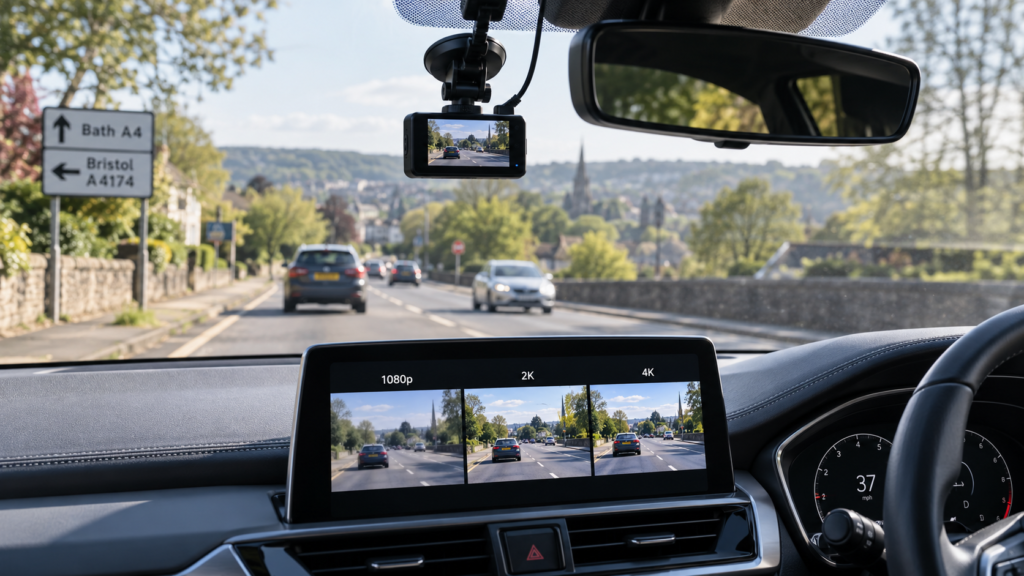
For most UK drivers, a good 2K (1440p) dash cam offers an excellent balance between video detail, storage requirements and cost. A genuine 4K dash cam can capture finer details, but it isn’t automatically better than a well-designed 2K camera.
And 1080p? It’s certainly not obsolete. A reliable Full HD dash cam can still provide useful evidence of road incidents.
The real question isn’t simply how many pixels your camera records. It’s whether those pixels capture the details you might actually need after an accident.
Let’s compare the different resolutions and work out where spending extra money makes sense.
If you’re still deciding which dash cam features matter most, our Dash Cam Buying Guide UK covers everything from parking protection to GPS, night vision and installation.
What Do 1080p, 2K and 4K Mean on a Dash Cam?
These terms describe the resolution of a video recording, which is essentially the number of pixels making up each frame.
More pixels provide the potential to capture finer details, such as number plates, road signs and objects further away.
But here’s where marketing can be a little misleading: resolution describes the size of the recorded image, not necessarily how clear or useful that image will be.
1080p Full HD
1080p is commonly called Full HD. Its standard resolution is 1920 × 1080 pixels, which works out at approximately 2.1 million pixels per frame.
It’s widely used for affordable dash cams and can provide perfectly useful footage in good recording conditions.
2K or 1440p Quad HD
Many dash cams advertised as 2K use a resolution of 2560 × 1440 pixels, also known as QHD or 1440p.
That gives you approximately 3.7 million pixels per frame, considerably more than 1080p.
One thing worth checking: the term “2K” isn’t always used consistently by manufacturers. Some products use it for other resolutions, including approximately 2048 pixels horizontally.
Check the actual pixel dimensions rather than relying on the 2K label alone.
4K Ultra HD
Most consumer 4K dash cams use 3840 × 2160 resolution, producing approximately 8.3 million pixels per frame.
That’s four times the pixel count of 1080p and more than twice that of 1440p.
On paper, it sounds like the obvious winner. In practice, there’s more to consider.
1080p vs 2K vs 4K Dash Cam: Quick Comparison
| Feature | 1080p | 2K / 1440p | 4K UHD |
|---|---|---|---|
| Typical resolution | 1920 × 1080 | 2560 × 1440 | 3840 × 2160 |
| Pixels per frame | 2.1 million | 3.7 million | 8.3 million |
| Potential fine detail | Good | Higher | Highest of the three |
| Storage demand | Generally lower | Moderate | Often higher |
| Purchase cost | Often lower | Mid-range | Often higher |
| Best suited for | Basic everyday recording | Balanced quality and value | Drivers prioritising extra detail |
Remember that these are general comparisons. Actual video quality, file size and price vary between models.
1. Is a 1080p Dash Cam Still Good Enough?
Yes. A good 1080p dash cam can still be a sensible choice for everyday driving.
Imagine you’re approaching a roundabout when another driver suddenly pulls out in front of you. You brake sharply, and fortunately, nobody is hurt.
If you later need to show what happened, a clear Full HD recording may be perfectly sufficient to demonstrate the sequence of events.
It can capture road positioning, traffic lights, vehicle movements and the general circumstances surrounding an incident.
Where 1080p becomes less capable is when you need to examine very small details, especially at a distance or while vehicles are moving quickly.
Advantages of 1080p Dash Cams
- Usually more affordable than comparable higher-resolution models.
- Generally produces smaller video files at similar compression settings.
- Can be sufficient for recording everyday road incidents.
- Often places lower demands on memory card capacity.
- Can offer smooth recording at higher frame rates on supported models.
What Are the Limitations?
Fine details, particularly distant number plates, may be harder to identify.
And if you need to crop or zoom into a small part of the recording, the limited pixel count becomes more noticeable.
That said, a well-designed 1080p camera can produce better footage than a cheaply made 4K camera with poor image processing.
So if you’re shopping on a budget, don’t automatically dismiss Full HD.
2. Is a 2K Dash Cam the Best Balance?
For many drivers, 1440p is the sensible middle ground.
You get more pixels than Full HD without the typically larger files associated with 4K recording.
That extra resolution can help when you need to examine details such as road markings, signs or vehicles at a moderate distance.
Imagine you’re driving along a busy dual carriageway. A vehicle changes lanes unexpectedly, and you want to review exactly what happened.
A good 1440p recording may preserve more usable detail than 1080p, particularly when you need to enlarge part of the frame.
But importantly, the improvement depends on the rest of the camera.
Sensor performance, lens sharpness, exposure and video compression can all affect the result.
Why We Think 2K Makes Sense for Many Drivers
- More potential image detail than 1080p.
- Usually smaller files than comparable 4K recordings.
- Suitable for everyday commuting and longer journeys.
- Available across a range of camera configurations.
- A practical compromise between clarity and storage.
Our view: If you’re not sure whether you need 4K, a good-quality 1440p dash cam is a sensible place to start.
It provides additional detail without making maximum resolution the only priority.
3. Is a 4K Dash Cam Really Worth the Extra Money?
Sometimes, absolutely.
A genuine 4K camera has significantly more pixels available to describe the scene. With good optics and processing, this can make small details easier to examine.
It may be useful if you frequently drive on motorways, want to review distant objects or need extra flexibility when cropping recordings.
For example, imagine another vehicle makes an unsafe lane change on a motorway.
Higher-resolution footage may give you a better chance of examining the vehicle’s number plate or other identifying details, provided the lighting, distance and movement allow it.
But here’s the important part.
4K doesn’t guarantee that a number plate will be readable, and it doesn’t automatically mean the footage will look better at night.
There are excellent higher-resolution dash cams, and there are models where the 4K label sounds more impressive than the actual recording looks.
When 4K May Be Worth Paying For
- You regularly drive at motorway speeds.
- You want more flexibility when cropping footage.
- You prioritise fine image detail.
- You’ve checked genuine sample footage from the camera.
- The camera also has good sensor and lens performance.
- You’re comfortable with the potential additional storage requirements.
If none of those factors particularly matters to you, spending more purely to get a 4K label may not be the best use of your budget.
4. Can a 4K Dash Cam Read Number Plates Better?
Potentially, yes. But there are no guarantees.
Number plate readability is one of the main reasons drivers consider higher-resolution cameras.
More pixels can help preserve detail, especially when a registration plate occupies only a small part of the image.
However, resolution is only one part of the problem.
Think about trying to photograph a moving car at night with your phone. Even if your phone has a high-resolution camera, the result might still be blurry.
A dash cam faces similar challenges.
What Affects Number Plate Readability?
- Distance: A plate further away occupies fewer pixels.
- Vehicle speed: Fast relative movement can introduce motion blur.
- Exposure time: Longer exposures can make moving objects appear less sharp.
- Lighting: Bright headlights and darkness can make details difficult to capture.
- Lens quality: Poor optics can soften fine details even at high resolution.
- Compression: Heavy video compression may remove important detail.
- Weather: Rain, fog and reflections can reduce visibility.
So while 4K provides more potential detail, a good 2K camera with better exposure control may capture a clearer plate in difficult conditions.
Don’t judge a dash cam only by daytime screenshots. Look for real recordings of moving vehicles in conditions similar to your own driving.
5. Why Can a 2K Dash Cam Look Better Than a 4K Camera at Night?
This is one of the most interesting aspects of dash cam technology.
We naturally assume that more pixels mean a better picture. And in good lighting, higher resolution can certainly help.
At night, however, cameras have a much harder job.
There’s less available light, headlights create bright hotspots, and the camera must constantly adjust to changing conditions.
A high-resolution sensor doesn’t automatically handle these challenges better.
Image Sensor Quality
The sensor converts incoming light into image information.
Different sensors have different capabilities when it comes to sensitivity, noise and dynamic range.
A well-designed sensor can preserve useful detail in difficult lighting, even when its recording resolution is lower.
HDR and WDR
High Dynamic Range (HDR) and Wide Dynamic Range (WDR) technologies aim to improve the handling of scenes containing both bright and dark areas.
This can be useful when recording vehicles with headlights approaching against a dark background.
However, implementations vary, and these features don’t guarantee perfect night recordings.
Lens Quality and Aperture
A good lens helps the camera capture a sharper image and transmit light effectively to the sensor.
Poor optics can undermine the advantage of higher resolution.
Video Processing
The camera’s processor decides how to handle exposure, noise reduction, sharpening and compression.
Overly aggressive processing can make footage look smooth while removing the small details you actually need.
The lesson: A good 2K camera can outperform a poor 4K camera at night. Compare real low-light footage rather than assuming the highest resolution always wins.
6. What Is the Difference Between Real 4K and Upscaled 4K?
Not every camera advertising a 4K output necessarily captures that amount of native image detail.
Some devices use interpolation or upscaling to produce a larger video file from lower-resolution source information.
Upscaling adds pixels to the output, but it doesn’t magically recover details the original sensor never captured.
Think of enlarging a small photo on your computer. The file can become bigger, but the extra pixels don’t automatically make a distant number plate readable.
When assessing a 4K dash cam, check:
- The actual recorded video resolution.
- The sensor’s native resolution.
- Whether the manufacturer explains how 4K recording is achieved.
- Independent sample footage captured in different conditions.
- Whether the front camera maintains the advertised resolution when a rear camera is connected.
A genuine high-resolution sensor isn’t the only requirement for good results, but it helps establish whether the advertised recording specification is meaningful.
7. What Matters More: Resolution or FPS?
FPS stands for frames per second. It describes how many individual images the camera records each second.
Common dash cam settings include 30fps and 60fps, although availability varies by model and resolution.
At 30fps, the camera records 30 frames every second. At 60fps, it records twice as many.
Higher frame rates can make movement appear smoother and may provide more individual frames from which to examine a fast-moving event.
However, they don’t automatically eliminate motion blur or improve night-time footage.
In low light, higher frame rates can also restrict the time available to capture light for each frame, depending on how the camera controls exposure.
4K at 30fps vs 1080p at 60fps
Which is better?
The 4K option provides more pixels per frame. The 1080p option provides more frames per second.
If you want the highest potential detail in each frame, 4K may have the advantage.
If smooth motion is a priority, 60fps may be useful.
But the result ultimately depends on how well each camera handles the conditions.
Some cameras allow you to choose between different resolution and frame-rate combinations. Check the actual recording options rather than assuming every model supports 4K at 60fps.
8. What Is Video Bitrate and Why Does It Matter?
Bitrate is one of those specifications that rarely gets the same attention as resolution, even though it can make a noticeable difference.
Video bitrate describes how much data is used to encode footage over time.
Two cameras can record at exactly the same resolution but produce noticeably different results because they use different compression settings and encoding methods.
If a camera compresses footage too aggressively, fine details may be lost.
You might notice blocky areas, smudged movement or road signs that look less sharp than expected.
A higher bitrate can help preserve detail, although it also creates larger files.
More bitrate isn’t automatically better in every situation. Efficient video codecs and good processing can make a difference too.
What this means when buying: Don’t assume two dash cams labelled 4K will produce identical video quality. Their actual recording settings can be very different.
9. How Much Storage Does 1080p, 2K and 4K Use?
Higher-resolution footage often requires more storage, particularly when recorded at higher bitrates.
That’s worth considering because most dash cams use loop recording.
When the card fills up, the camera normally overwrites the oldest unprotected footage.
So if your camera produces much larger files, you’ll generally have a shorter recording history on the same memory card.
Example: Recording Time on a 128GB Card
To give you a realistic comparison, Nextbase has published the following approximate recording durations for different resolutions.
| Recording Resolution | Approximate Time on 128GB |
|---|---|
| 1080p | 1,130 minutes (18 hours 50 minutes) |
| 1440p | 545 minutes (9 hours 5 minutes) |
| 4K | 330 minutes (5 hours 30 minutes) |
Source: Nextbase recording time guidance. These are examples based on particular camera recording characteristics, not universal figures for every dash cam.
Actual recording duration varies depending on bitrate, video codec, frame rate, camera configuration and storage settings.
Adding a rear camera can reduce available recording time further because the memory card may need to store two video streams simultaneously.
This doesn’t mean 4K is impractical. It simply means you need to think about storage as part of the purchase.
Our Dash Cam SD Card guide explains capacity, endurance and compatibility in more detail.
10. Is 4K Worth It for a Front and Rear Dash Cam?
Possibly, but you need to look closely at how the system is advertised.
A front and rear camera kit might be described as a 4K dash cam even when only the front camera records in 4K.
For example, some dual-camera configurations use:
- 4K recording at the front and 1080p at the rear.
- 4K recording at the front and 2K at the rear.
- 1440p recording on both cameras.
- 1080p recording on both cameras.
All of these can be legitimate configurations. What matters is whether they suit your needs.
There’s also a question of whether the front camera’s available resolution or frame rate changes once the rear camera is connected.
Some models have recording limitations when operating multiple channels, while others maintain their advertised front resolution.
If you want broad coverage rather than maximum front-facing detail, a good 2K dual-camera setup may be more useful than a 4K front-only model.
We’ve covered this decision in our Front vs Front and Rear Dash Cam guide.
11. Does Higher Resolution Improve Parking Mode?
It can improve the potential detail in recordings, but resolution isn’t the most important part of parking surveillance.
Imagine your car is parked outside a supermarket when another driver reverses into it.
A 4K camera might record a very detailed image of the car park.
But if the dash cam switched off when you turned off the engine, those extra pixels won’t help you much.
For parking protection, you should first consider:
- Whether the camera supports parking mode.
- How the camera receives power when parked.
- Whether it can capture footage before an incident.
- What activates the recording.
- Whether its field of view covers the area of concern.
- How well it records in low light.
After that, recording resolution becomes an additional factor.
A reliable 1080p or 2K parking recording system may be more useful than a higher-resolution camera without suitable parking functionality.
For a detailed explanation, read Do Dash Cams Record When the Car Is Off? Parking Mode Explained.
If protecting your parked vehicle is your main priority, our Dash Cam for Parking Protection guide looks at the features worth paying attention to.
12. Can You Watch 4K Dash Cam Footage on Your Phone?
Yes, many 4K dash cams support smartphone viewing through a compatible app, although this varies by model.
But there’s something to remember.
4K footage can produce large files, which may take longer to transfer over a wireless connection.
Some cameras also create lower-resolution preview files for easier playback through the app.
That means the footage you see on your phone may not always show the full quality of the original 4K recording.
If you want to examine small details, downloading the original file and viewing it on a suitable screen may give you a better basis for judging the recording.
And if a camera offers WiFi, that doesn’t mean the connection itself improves recording quality.
For more on how camera apps work, read Wireless Dash Cams Explained: WiFi, Power Cables and Installation.
13. Does Recording in 4K Use More Battery Power?
Higher-resolution video processing can increase a camera’s electrical demands, but actual power consumption depends on the hardware and design.
It would be misleading to say every 4K dash cam uses more electricity than every 1080p model.
Different cameras use different sensors, processors, screens, wireless features and power-management systems.
If you’re planning to use parking surveillance, check the manufacturer’s power consumption specifications and compatible installation requirements.
The correct power arrangement matters more than making assumptions based on resolution alone.
Our Dash Cam Without Hardwiring guide explains the options for powering your camera and why the installation method matters.
14. Which Resolution Is Best for Your Driving?
Not everyone needs the same camera, and spending more doesn’t automatically mean you’re getting something better suited to your car.
Here’s how we’d approach the decision.
| Driving Situation | Resolution to Consider | Why |
|---|---|---|
| Short everyday commutes | 1080p or 2K | Reliable recording and practical file sizes |
| Regular motorway journeys | 2K or 4K | Higher potential detail for moving vehicles |
| Mostly night driving | Good-quality 2K or 4K | Sensor and low-light performance are critical |
| Limited budget | Good 1080p | Prioritise reliability over marketing specifications |
| Wanting maximum image detail | Genuine 4K | More pixels available for detailed review |
| Front and rear coverage | 2K or 4K front with a suitable rear camera | Balances detail and recording angles |
| Long recording history | 1080p or 2K | Often lower storage requirements |
These are starting points rather than strict rules.
A camera’s actual performance is more important than choosing a particular resolution in isolation.
15. What Else Should You Check Before Buying?
If you’re comparing two dash cams with similar resolution specifications, look at the details that don’t always appear in the product title.
- Native sensor resolution: Is the camera capturing genuine detail or upscaling a lower-resolution image?
- Night footage: Are moving number plates reasonably clear under realistic lighting conditions?
- Frame rate: Which combinations of resolution and FPS are actually supported?
- Video bitrate: Is footage heavily compressed?
- HDR or WDR: How well does the camera handle headlights and contrasting light?
- Rear camera specifications: Does the resolution change in dual-camera mode?
- Memory card support: Which capacities and card types are compatible?
- Recording reliability: Does the camera save footage consistently?
- Sample recordings: Can you see genuine footage rather than relying only on promotional images?
Also remember to look at practical features such as WiFi, GPS, parking mode and installation requirements.
A camera with impressive resolution but poor usability may not be the best choice for everyday driving.
Frequently Asked Questions
Is a 4K dash cam better than 1080p?
A genuine 4K dash cam can capture more detail because it records more pixels per frame. However, overall quality depends on the image sensor, lens, exposure, processing and compression. A good 1080p camera can still produce more useful footage than a poorly designed 4K model.
Is 2K good enough for a dash cam?
Yes. For many UK drivers, a good 2K or 1440p dash cam offers a practical balance between image detail, price and storage requirements. It can provide more potential detail than 1080p without the larger files commonly associated with 4K.
Can a 4K dash cam read number plates at night?
Sometimes, but not reliably in every situation. Lighting, speed, distance, exposure and sensor quality all affect number plate readability. Higher resolution alone cannot guarantee clear footage at night.
Is 1440p the same as 2K?
1440p is commonly marketed as 2K in the dash cam industry, although the terminology isn’t used consistently. Most 1440p cameras record at 2560 × 1440 pixels. Always check the actual resolution listed in the specifications.
Does 4K use more memory than 1080p?
Usually, when other recording factors are comparable. Higher-resolution footage commonly uses higher bitrates and creates larger files. However, the precise difference depends on compression, frame rate and camera settings.
Is 4K worth it for motorway driving?
It can be. Genuine 4K footage may capture more fine detail at greater distances, which can be helpful when examining motorway incidents. However, camera quality and recording conditions remain important.
Is 4K at 30fps better than 1080p at 60fps?
Neither is universally better. 4K at 30fps provides more pixels in each frame, while 1080p at 60fps provides more frames per second. The better option depends on the camera’s performance and what you’re trying to capture.
Can you change a 4K dash cam to record in 1080p?
Many 4K dash cams offer alternative recording resolutions, but this depends on the model. Check the manufacturer’s settings and available frame-rate combinations.
Is genuine 4K different from upscaled 4K?
Yes. Native 4K recording captures approximately 8.3 million pixels per frame, while upscaled footage can be created from lower-resolution information. Upscaling does not automatically recover the fine detail missing from the original recording.
Should I buy a 4K front camera or a 2K front and rear dash cam?
If maximum detail ahead is your priority, a good 4K front camera may make sense. If you want additional recording coverage, a 2K front and rear system may be more useful. The right choice depends on driving habits and camera quality.
Does a higher-resolution dash cam use more power?
Not necessarily in every comparison. Video processing requirements can affect power consumption, but actual electricity use depends on the camera’s hardware, features and design. Always check the manufacturer’s specifications.
Explore More Dash Cam Buying Guides
Choosing the right resolution is only part of finding a dash cam that suits your vehicle. Our other Knowledge Hub guides explore the features and practical questions worth understanding before buying.
- Dash Cam Buying Guide UK: How to Choose the Right Dash Cam
- Front vs Front and Rear Dash Cam: Is a Rear Camera Worth It?
- Do Dash Cams Record When the Car Is Off? Parking Mode Explained
- Wireless Dash Cams Explained: WiFi, Power Cables and Installation
- Dash Cam Without Hardwiring: How Can You Power It?
- Dash Cam for Parking Protection: What Features Do You Need?
- What SD Card Do You Need for a Dash Cam?
- Are Dash Cams Legal in the UK and Europe? Rules for Driving Abroad
Final Verdict: Should You Choose 1080p, 2K or 4K?
If you’re hoping for one simple answer, we’d say this: for most drivers, a good 2K dash cam is an excellent starting point.
It offers additional detail over 1080p without necessarily bringing the larger recording files of 4K.
That doesn’t mean 1080p is a poor choice. A reliable Full HD camera can still provide useful evidence and may be perfectly suitable for someone who wants straightforward journey recording.
And if you’re willing to spend more for genuine additional detail, a good 4K camera can absolutely be worth it.
Just don’t let the biggest number on the box make the decision for you.
A camera that captures clear footage consistently is far more valuable than one with impressive specifications but disappointing real-world recordings.
Because if something goes wrong on the road, nobody is going to be particularly impressed that your camera advertised 4K if the important details are impossible to see.
Ready to compare your options? Explore the PYC Online Dashcam collection to find 1080p, 2K and 4K cameras, including models with front and rear recording, WiFi and other features.
For more straightforward buying advice, visit our Knowledge Hub.
Leave a comment