
Dash Cam Without Hardwiring: How Can You Power It?
Dash Cam Without Hardwiring: How Can You Power It?
You’ve bought a dash cam, you’re ready to install it, and then the instructions start talking about fuse boxes, permanent live connections and hardwire kits.
Suddenly, fitting a little camera to your windscreen sounds like a job for an electrician.
But here’s the good news: in many cases, you don’t need to go anywhere near your car’s fuse box.
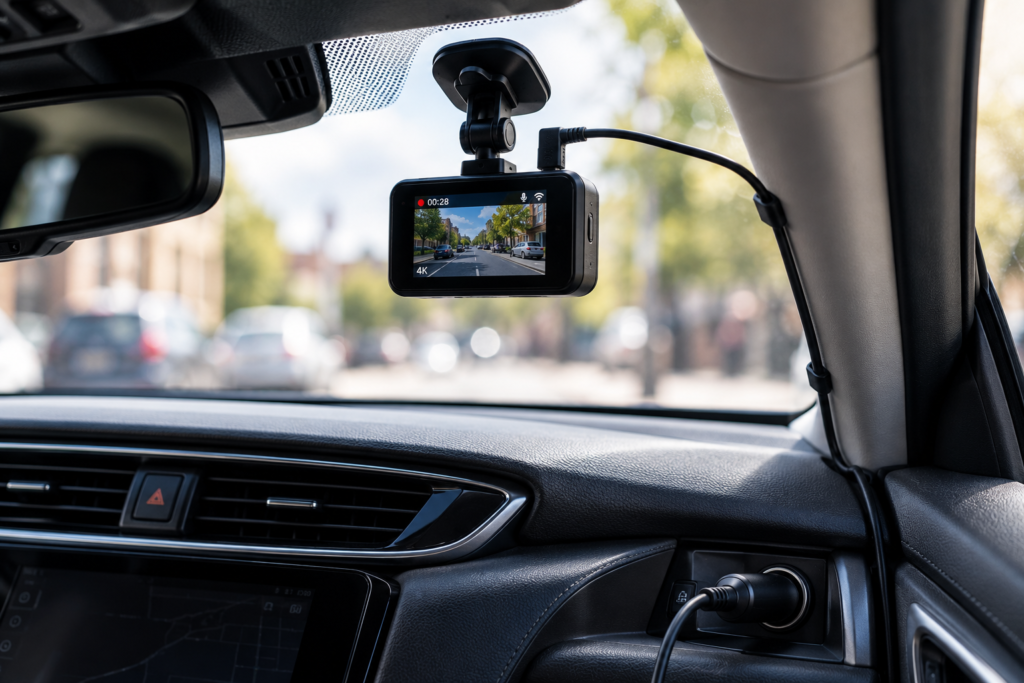
Yes, you can use a dash cam without hardwiring it. Most standard dash cams can be powered through a compatible 12V accessory socket or USB connection, while certain models support OBD-II power adapters or dedicated external battery packs.
The important question isn’t whether hardwiring is compulsory. It’s what you want your camera to do.
If you simply want to record your journeys, a plug-in installation may be all you need. If you want the camera watching your parked car overnight, things become a little more complicated.
In this guide, we’ll explain how to power a dash cam without hardwiring, compare the alternatives and help you avoid an installation that either doesn’t record when you need it or leaves you with a flat battery.
Still choosing your camera? Our Dash Cam Buying Guide UK explains the main recording features worth looking for before buying.
Do You Have to Hardwire a Dash Cam?
No. Hardwiring is an installation option, not a universal requirement.
Many dash cams are designed to work using an included vehicle power adapter. You mount the camera, connect the cable to a suitable power outlet and the camera begins recording when power becomes available.
For drivers who only need footage while travelling, that arrangement can work perfectly well.
Hardwiring is generally considered when someone wants a neater installation, doesn’t want to occupy the vehicle’s accessory socket or needs a particular parking mode power arrangement.
However, hardwiring doesn’t automatically mean parking mode will work. The camera, wiring arrangement and power supply must all support it.
Likewise, a camera connected without hardwiring may support parking surveillance if the manufacturer provides an appropriate alternative.
Let’s look at the options.
1. Using a 12V Cigarette Lighter Socket
For many UK drivers, this is the easiest way to power a dash cam.
Although we still call it a cigarette lighter socket, most of us haven’t actually used one to light a cigarette in years. These days, it’s more likely to be charging a phone or powering another car accessory.
Many dash cams include a compatible 12V vehicle adapter and power cable.
Installation is generally straightforward:
- Choose a safe mounting position for the dash cam.
- Attach the camera using its supplied mounting system.
- Connect the manufacturer’s recommended power cable.
- Plug the adapter into the vehicle’s 12V accessory socket.
- Switch on the ignition and check that the camera starts recording.
- Adjust the camera angle to capture a clear view of the road.
The exact process depends on your camera and vehicle, so always follow the manufacturer’s installation instructions.
Advantages of a 12V Plug-In Installation
- No direct connection to the fuse box.
- Usually straightforward to install.
- Can be removed when changing vehicles.
- Suitable for many front-only and dual-camera systems.
- Often uses the power adapter already supplied with the dash cam.
What Are the Disadvantages?
The most obvious downside is the cable.
If you simply plug everything in and leave the wire hanging down the windscreen, the result probably won’t win any awards for interior design.
Fortunately, cables can often be routed neatly, provided you avoid airbags, vehicle controls and safety equipment.
Another limitation is that the accessory socket may stop supplying electricity when the ignition is switched off.
That usually means the camera shuts down too.
But some vehicles have permanently powered accessory sockets, so the behaviour isn’t identical in every car.
Will a Dash Cam Automatically Turn On With the Engine?
Usually, if the dash cam supports automatic recording and the vehicle supplies power when the ignition is switched on.
Some cameras begin recording as soon as their power source becomes active.
However, if your accessory socket remains powered when the car is switched off, the camera may continue operating unless it has a suitable shutdown or parking mode arrangement.
Check how your vehicle’s socket behaves rather than assuming all cars work the same way.
2. Can You Power a Dash Cam Through USB?
Sometimes, yes.
Many modern vehicles have USB-A or USB-C ports, so using one to power a dash cam sounds like an obvious solution.
And for compatible cameras, it can be.
But there’s a small detail that matters: having the right connector doesn’t necessarily mean having the right electrical supply.
A USB-C socket can look exactly right while still being unsuitable for a particular camera.
Different USB ports and adapters support different voltage, current and power-delivery arrangements.
Some vehicle USB ports are intended mainly for data connections or low-power charging, while others can provide more power.
What Should You Check?
- The voltage required by your dash cam.
- The current or power required by the camera.
- The type of USB connection supported.
- Whether the USB port supplies power reliably during driving.
- Whether the camera requires a particular manufacturer’s cable or adapter.
- Whether the port stays powered after the ignition is switched off.
Don’t cut the plug off a supplied 12V adapter and connect its cable directly to another power source. Some adapters contain essential voltage-conversion circuitry.
Using an incorrect supply can damage the camera.
Is USB Better Than a 12V Socket?
Not necessarily.
If your camera is designed to receive suitable USB power and the vehicle can provide it, USB may be convenient.
But a manufacturer-approved 12V adapter can be more reliable than an incompatible USB connection.
It’s not about which plug looks newer. It’s about supplying the voltage and power the camera actually requires.
3. Can You Power a Dash Cam Through an OBD-II Port?
Yes, certain dash cams support compatible OBD-II power adapters.
OBD-II stands for On-Board Diagnostics. It’s the connection commonly used to access vehicle diagnostic information.
In many passenger cars, the port is located somewhere around the driver’s lower dashboard area, although its exact position varies.
Some dash cam manufacturers offer adapters that connect to this port and supply power to compatible cameras.
For example, Garmin offers a Constant Power Cable that uses a suitable vehicle OBD-II connection to power supported dash cams after the engine is switched off.
However, that doesn’t mean you can buy any cheap OBD-II cable and expect it to work with every camera.
Advantages of OBD-II Power
- Can avoid direct wiring into the fuse box.
- May provide a more permanent power arrangement than a standard accessory plug.
- Some compatible adapters support parking surveillance.
- Certain models include power timers or battery protection.
Potential Limitations
- Not every dash cam supports OBD-II power.
- Vehicle compatibility must be checked.
- Generic adapters may not provide the correct output or protection.
- The cable still needs to be routed safely.
- Parking mode may depend on the exact adapter and camera combination.
Also, some vehicles may already have diagnostic or monitoring equipment connected to the port.
Our advice: If you’re considering OBD-II power, choose a manufacturer-approved adapter or one explicitly documented as compatible with both your vehicle and dash cam.
It’s a useful option, but not a universal shortcut around proper installation.
4. Can You Use a Power Bank for a Dash Cam?
Technically, certain cameras can run from a suitable external battery. But there’s an important distinction between a dedicated dash cam battery pack and an ordinary phone power bank.
They may both store electrical energy, but they’re not necessarily designed for the same environment.
Dedicated Dash Cam Battery Packs
These systems are designed specifically to supply power to compatible vehicle cameras.
Depending on the product, a dedicated battery pack may charge while the vehicle is running and then power the dash cam when the ignition is switched off.
That can be particularly useful for parking mode.
Some systems reduce the amount of energy taken directly from the vehicle’s starter battery during parking surveillance.
BlackVue, for example, offers compatible external battery solutions designed for dash cam parking recording.
But an external battery isn’t an unlimited power source. The recording duration depends on its capacity, the camera’s power consumption and how the system is configured.
What About an Ordinary USB Power Bank?
It’s tempting to use the same power bank you take on holiday.
After all, if it charges your phone, surely it can power a little camera?
Possibly, if the electrical output is compatible. But there are several practical and safety issues.
Consumer power banks aren’t necessarily designed to be left inside a vehicle exposed to high temperatures, freezing conditions or prolonged unattended operation.
Some also shut down automatically when the connected device draws very little power. Others may not support the required pass-through charging or power behaviour.
There are also battery safety concerns. A car interior can become extremely hot in direct sunlight, even when the outside temperature doesn’t seem particularly high.
We wouldn’t recommend leaving an ordinary consumer power bank permanently inside a car for unattended dash cam recording unless its manufacturer explicitly approves that use.
A suitable dedicated automotive dash cam battery system is generally the more appropriate option for extended parking surveillance.
5. Can a Dash Cam Work on Its Own Internal Battery?
Some dash cams include a small rechargeable battery. Others use a supercapacitor.
Neither feature automatically means the camera can record for several hours without external power.
Built-In Rechargeable Batteries
In many dash cams, the internal battery provides enough power for a safe shutdown, saving the final video file or operating briefly without the vehicle supply.
The available recording time varies by model.
Unless the manufacturer specifically states otherwise, don’t assume an internal battery can support an entire journey or overnight surveillance.
Supercapacitors
A supercapacitor stores a relatively small amount of electrical energy and is often used to help the camera shut down safely after power is disconnected.
Supercapacitor-based dash cams may offer advantages in temperature tolerance compared with certain battery-based designs, but they still require an external supply for ordinary recording.
A supercapacitor is not a substitute for a dedicated parking mode battery.
6. Comparing Dash Cam Power Options
So which installation method makes the most sense?
Here’s a practical comparison.
| Power Method | Fuse Box Connection? | Parking Mode Potential | Main Consideration |
|---|---|---|---|
| 12V Accessory Socket | No | Depends on vehicle and camera | Often switches off with ignition |
| Vehicle USB Port | No | Depends on power supply and camera | Electrical compatibility |
| OBD-II Adapter | No | Supported on certain systems | Adapter and vehicle compatibility |
| Dedicated Battery Pack | Not necessarily | Supported on compatible systems | Battery capacity and charging requirements |
| Hardwire Kit | Usually yes | Supported with suitable configuration | Correct electrical installation |
| Internal Camera Battery | No | Usually very limited | Short operating duration |
For straightforward journey recording, a suitable 12V or USB connection may be enough.
If your main priority is recording while parked, you’ll need to pay much closer attention to power management and the camera’s supported features.
7. Can a Dash Cam Record When the Engine Is Off Without Hardwiring?
Yes, with a suitable camera and power arrangement.
However, there are two separate requirements:
- The dash cam must support the type of parking recording you want.
- It must continue receiving suitable power when the vehicle is switched off.
Meeting just one of those requirements isn’t enough.
For example, a camera may advertise impact detection and parking mode, but if its only power source switches off with the ignition, it might not be able to monitor the vehicle.
On the other hand, an always-powered accessory socket may keep a camera operating without activating its dedicated parking settings.
Some systems require an ignition signal to switch between normal recording and parking surveillance.
What Are Your Options Without Hardwiring?
Depending on compatibility, you may be able to use:
- A manufacturer-approved OBD-II power adapter.
- A dedicated dash cam battery pack.
- A suitable always-powered connection where supported by the manufacturer.
- Another approved parking power accessory designed for your camera.
Before purchasing any of these, check the camera’s installation instructions.
Our Dash Cam Parking Mode Explained guide covers impact detection, motion recording, buffering and what happens when the engine is switched off.
8. Will Leaving a Dash Cam Plugged In Drain Your Car Battery?
It depends on whether the camera continues drawing power after the engine is switched off.
If your vehicle cuts power to the accessory socket and the dash cam shuts down, it normally won’t continue drawing power through that socket while parked.
But if the socket remains active, the camera may continue using electricity from the vehicle battery.
Leave it running long enough, and you could eventually have trouble starting the engine.
Which rather defeats the purpose of protecting your vehicle.
How Can You Reduce the Risk?
- Check whether your power socket remains active after switching off the ignition.
- Use a suitable power adapter with battery protection where required.
- Look for low-voltage cut-off functionality.
- Consider a recording timer where supported.
- Check the condition of your vehicle’s battery.
- Use a compatible external battery if extended parking recording is important.
Low-voltage protection can help reduce excessive battery discharge, but it’s not a guarantee that the engine will start under every condition.
Battery age, outside temperature, vehicle electrical loads and the configured cut-off threshold all make a difference.
We explain these considerations further in our Dash Cam for Parking Protection guide.
9. How Do You Hide Dash Cam Cables Without Hardwiring?
One of the main reasons drivers consider hardwiring is that they don’t want a cable hanging down from the windscreen.
Fair enough. Nobody wants their dashboard looking like the back of a television cabinet.
But hardwiring isn’t the only way to achieve a tidy appearance.
Depending on the vehicle, a suitable power cable can often be routed along the edge of the windscreen and towards the required socket.
However, safe routing matters much more than hiding every last centimetre of cable.
Installation Tips
- Position the camera where it won’t obstruct the driver’s view.
- Check the camera can see the road clearly before securing the cable.
- Use a cable long enough to follow an appropriate route.
- Keep cables away from pedals, steering controls and moving components.
- Never route wiring across an airbag deployment path.
- Avoid pinching cables in sharp trim edges or moving panels.
- Follow vehicle and camera manufacturer guidance.
Many vehicles have curtain airbags around the roofline and pillars. Incorrectly placing a cable behind these areas can create a safety risk.
If you’re unsure about the safe route, consult a professional installer rather than forcing the cable behind trim panels.
10. Is a Dash Cam Easy to Move Between Cars?
Usually, a plug-in installation is easier to transfer than a permanently hardwired one.
This can be useful if you drive more than one vehicle or expect to change your car.
However, how easy it is to move the camera depends on its mounting system.
Some dash cams use suction mounts that can be repositioned. Others use adhesive mounting pads, which may require replacement when moved.
You may also need a second compatible power cable or mount.
If portability is important, check the mounting arrangement before buying.
Don’t assume that every compact dash cam is designed for frequent removal.
11. Can You Power a Front and Rear Dash Cam Without Hardwiring?
Yes. Many dual-camera systems can operate using a compatible plug-in power supply while driving.
The front camera usually receives power from the vehicle and connects to the rear camera through a separate cable.
However, the exact arrangement varies.
Some models have different power requirements depending on whether a rear camera is connected.
It’s also important to distinguish between powering both cameras and avoiding all wiring.
A front and rear dash cam may not require a fuse-box connection, but it will often still need a cable routed to the rear window.
And if you want both cameras recording while parked, check that the power arrangement and parking mode support simultaneous recording.
Our Front vs Front and Rear Dash Cam guide explains the benefits and practical limitations of dual-camera systems.
12. Does a Wireless Dash Cam Need a Power Cable?
Usually, yes.
The word “wireless” can be confusing because it often describes the camera’s WiFi connection rather than its power supply.
A WiFi dash cam may let you download recordings or change settings through your smartphone, but it still needs electricity to record.
Some models support Bluetooth pairing or cloud connectivity, but these features don’t remove the power requirement either.
So if you’ve bought a wireless camera expecting absolutely no wires, the included power cable isn’t necessarily a mistake.
We’ve covered this in detail in Wireless Dash Cams Explained: WiFi, Power Cables and Installation.
13. Which Power Option Is Best for Your Situation?
The right choice depends on how you actually plan to use your dash cam.
| Your Situation | Power Option to Consider | Why |
|---|---|---|
| Everyday commuting | Compatible 12V adapter | Simple installation and automatic recording where supported |
| Suitable built-in USB power | Manufacturer-approved USB connection | Convenient when electrical requirements match |
| Wanting to avoid the fuse box | 12V, USB or compatible OBD-II adapter | Can avoid direct hardwiring |
| Regular street parking | Compatible parking power accessory | Supports suitable parking surveillance |
| Extended parking recording | Dedicated dash cam battery pack | Can provide a separate source of power |
| Frequently changing vehicles | Plug-in supply with removable mount | Usually easier to transfer |
| Minimal visible cables | Suitable concealed cable routing | Improves appearance without necessarily hardwiring |
For many drivers, a straightforward plug-in connection is perfectly adequate.
It’s only when you start adding requirements such as extended parking mode, multiple cameras or permanent power that the installation becomes more involved.
14. Common Dash Cam Power Problems
Even simple installations can occasionally cause frustration.
Here are a few problems worth checking before assuming your camera is faulty.
The Dash Cam Doesn’t Turn On
Check whether the vehicle socket is powered, the adapter is correctly connected and the cable is compatible.
Try the installation according to the manufacturer’s instructions with the ignition switched on.
The Dash Cam Keeps Restarting
An unstable power supply, unsuitable cable or inadequate adapter may contribute to repeated shutdowns or restarts.
Check the recommended voltage and current requirements.
The Camera Doesn’t Switch Off
Your vehicle may have an always-powered accessory socket.
Check whether the camera supports an automatic shutdown setting or whether another suitable power arrangement would be better.
Parking Mode Doesn’t Work
The camera may need a compatible constant power source, ignition signal or dedicated parking accessory.
Simply leaving the camera connected to power does not necessarily activate parking mode.
The Camera Works in One Car but Not Another
Different vehicles have different socket behaviour, USB outputs and electrical systems.
What works in one car might not be suitable for another.
Check the installation requirements before moving the device.
15. What Should You Check Before Buying a Dash Cam Without Hardwiring?
Before ordering, take a few minutes to check the practical details.
- Does the dash cam include a compatible 12V power adapter?
- Can it be powered using your vehicle’s available USB connection?
- Does your car switch off its accessory socket with the ignition?
- Is parking mode important to you?
- Does the camera support an approved OBD-II adapter?
- Can you use a compatible external battery pack?
- Is the supplied cable long enough for a safe installation?
- Does the camera support automatic start and stop recording?
- Are the camera’s power requirements clearly specified?
- Will the installation interfere with airbags or your view of the road?
While you’re comparing models, don’t forget recording quality and storage requirements.
A straightforward 1080p camera may be perfectly adequate for general use, while 2K or genuine 4K recording may offer additional detail.
Our 1080p vs 2K vs 4K Dash Cam comparison explains when higher resolution is worth considering.
You can also explore the PYC Online Dashcam collection to compare available cameras and check their features and supplied accessories.
Frequently Asked Questions
Can I install a dash cam without hardwiring?
Yes. Many dash cams can be powered through a compatible 12V accessory socket or USB connection. Some also support manufacturer-approved OBD-II adapters or external battery packs.
Can a dash cam work from a cigarette lighter socket?
Yes. This is a common installation method. A suitable vehicle power adapter supplies electricity to the camera, often allowing it to start recording automatically when power becomes available.
Can you run a dash cam from USB?
Some dash cams support USB power, provided the port supplies the correct voltage and sufficient current or power. Check the camera’s specifications and use the recommended connection.
Can I use a dash cam without touching the fuse box?
Yes. A compatible plug-in accessory socket or USB connection generally avoids the need to access the fuse box. Certain OBD-II adapters and external battery solutions can also be suitable.
Does a dash cam need permanent power?
Not for ordinary journey recording. Many cameras only need power while driving. Parking surveillance may require constant power or another compatible arrangement.
Can a dash cam record overnight without hardwiring?
Yes, on certain systems using a compatible OBD-II adapter, dedicated external battery pack or approved power connection. Recording duration depends on the available energy, camera settings and power-management features.
Can I use a normal phone power bank for my dash cam?
Some cameras may operate from compatible USB power banks, but ordinary consumer power banks aren’t necessarily suitable for permanent unattended use inside a vehicle. Temperature exposure, battery safety and power compatibility must be considered.
Will leaving a dash cam plugged in drain my battery?
If the camera continues drawing power from the vehicle battery while the engine is off, it can contribute to battery discharge. A socket that switches off with the ignition normally prevents continued power draw through that connection.
Is OBD-II better than hardwiring?
Neither option is universally better. A compatible OBD-II adapter may avoid fuse-box installation, while a correctly installed hardwire kit can provide an integrated power arrangement. Compatibility, parking mode requirements and battery protection matter most.
Can I hide the cables without hardwiring?
Often, yes. A suitable cable can be routed around the vehicle interior, provided it doesn’t obstruct the driver’s view or interfere with airbags and controls. Consult a professional if you’re unsure about safe routing.
Do wireless dash cams need plugging in?
Usually, yes. Wireless normally refers to WiFi or other data connectivity rather than a completely cable-free power supply.
Can I power a front and rear dash cam without hardwiring?
Yes. Many dual-camera systems support compatible plug-in power arrangements while driving. However, the rear camera usually still needs a connecting cable, and parking mode may require additional equipment.
Explore More Dash Cam Buying Guides
Choosing the right power supply is only one part of finding a dash cam that suits your vehicle. Our Knowledge Hub covers the other features that are worth understanding before buying.
- Dash Cam Buying Guide UK: How to Choose the Right Dash Cam
- Front vs Front and Rear Dash Cam: Is a Rear Camera Worth It?
- Do Dash Cams Record When the Car Is Off? Parking Mode Explained
- Wireless Dash Cams Explained: WiFi, Power Cables and Installation
- 1080p vs 2K vs 4K Dash Cams: Is 4K Really Worth It?
- Dash Cam for Parking Protection: What Features Do You Need?
- What SD Card Do You Need for a Dash Cam?
- Are Dash Cams Legal in the UK and Europe? Rules for Driving Abroad
Final Thoughts: What’s the Best Way to Power a Dash Cam Without Hardwiring?
For most drivers who simply want to record their journeys, a compatible 12V accessory socket or suitable USB connection is a practical starting point.
It’s straightforward, doesn’t normally require altering the vehicle’s electrical wiring and can be enough for reliable everyday recording.
If you want to record while the car is parked, you’ll need to consider the camera’s parking features and how it receives power when the engine is switched off.
A compatible OBD-II adapter or dedicated dash cam battery may offer an alternative to connecting directly to the fuse box, but not every camera supports those arrangements.
And remember, a neat installation doesn’t necessarily require hardwiring. Safe cable routing can make a noticeable difference without turning a simple camera installation into an afternoon spent taking your dashboard apart.
Our advice: Choose the camera and power arrangement together. It’s much easier than buying a dash cam first and discovering later that your preferred installation method doesn’t support the features you wanted.
Ready to compare your options? Browse the Dashcam collection at PYC Online to explore available models, or visit our Knowledge Hub for more practical buying advice.
Leave a comment