
USB Sockets vs Standard UK Sockets: Which Should You Choose?
USB Sockets vs Standard UK Sockets: Which Should You Choose?
A standard UK socket provides a 13A outlet for appliances fitted with a three-pin plug, while a USB socket combines one or more standard plug outlets with built-in USB charging ports.
USB wall sockets can be a convenient addition to bedrooms, kitchens and home offices because they allow phones, tablets and other compatible devices to be charged without a separate plug adaptor. Standard sockets, however, offer greater flexibility because they can be used with almost any suitable appliance or charger.
The best option depends on the devices you use, the charging speed you need and how long you expect the socket to remain in place. In this guide, we compare USB sockets with standard UK sockets and explain what to check before choosing one for your home.
What Is a Standard UK Socket?
A standard UK socket is designed for a three-pin Type G plug and is commonly rated at 13 amps. It supplies mains electricity to appliances and chargers that have a suitable UK plug.
Standard sockets are used throughout UK homes for items such as:
- Televisions.
- Kettles and toasters.
- Lamps.
- Vacuum cleaners.
- Computers and monitors.
- Phone and tablet chargers.
- Kitchen appliances.
A standard socket does not usually contain its own charging electronics. When you connect a phone or tablet, the conversion from mains electricity to the lower-voltage power required by the device takes place inside the separate plug-in charger.
This means the socket itself remains useful even when charging technology changes. As long as you have a compatible plug-in charger, the same standard wall socket can be used with older and newer devices.
What Is a USB Wall Socket?
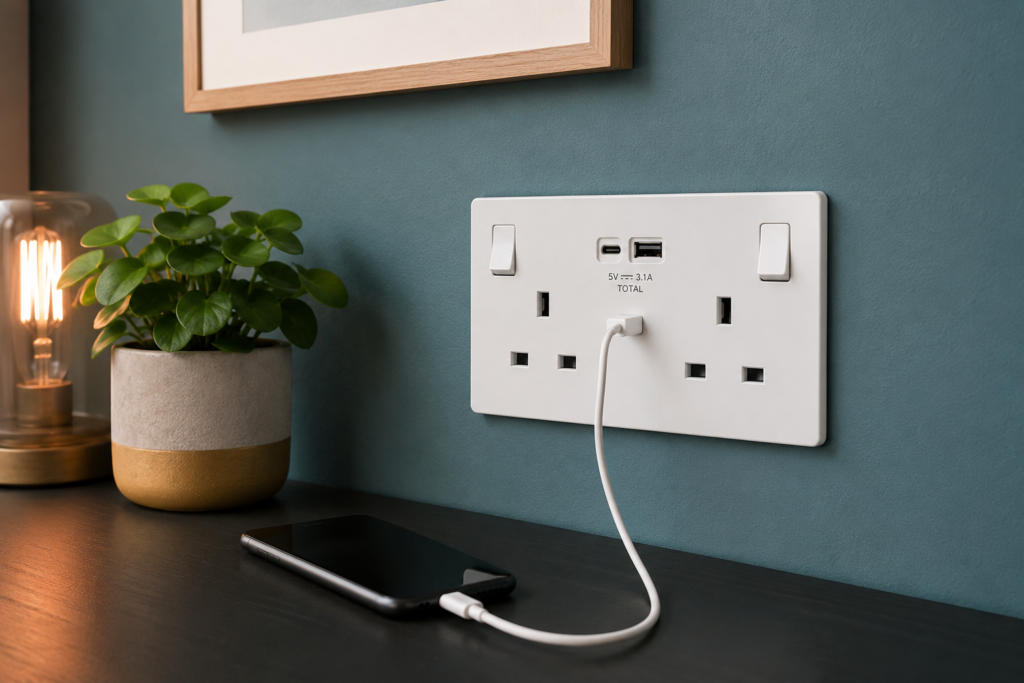
A USB wall socket combines a standard UK plug outlet with one or more built-in USB ports. Depending on the design, it may include USB-A ports, USB-C ports or a combination of both.
The charging electronics are built into the socket faceplate, so a separate plug adaptor is not always required. You can connect a compatible charging cable directly between the wall socket and your device.
USB sockets are often installed in:
- Bedrooms.
- Living rooms.
- Home offices.
- Kitchens.
- Hotel rooms.
- Guest rooms.
- Areas used for charging several personal devices.
They can help free up the standard plug outlets for other appliances and may reduce the number of chargers left on worktops, desks and bedside tables.
What Is the Main Difference Between a USB Socket and a Standard Socket?
The main difference is that a USB socket has built-in charging technology, while a standard socket relies on a separate plug-in charger.
With a standard socket, you connect the charging cable to an adaptor and plug that adaptor into the wall. With a USB socket, the cable can normally be connected directly to the USB port on the faceplate.
A standard socket is more universal because it can power a wide range of appliances, provided they have a suitable UK plug. A built-in USB port is intended mainly for charging compatible electronic devices.
USB sockets can be more convenient, but their charging performance depends on the specification of the ports. Two sockets that look very similar may provide very different charging speeds.
What Are the Advantages of USB Wall Sockets?
The main advantage of a USB wall socket is convenience. It allows a compatible device to be charged without searching for a separate plug adaptor.
Other possible advantages include:
- Keeping the standard plug outlets available for other appliances.
- Reducing the number of bulky chargers around a socket.
- Creating a tidier charging area beside a bed or desk.
- Allowing several devices to be connected in one place.
- Providing a permanent charging point for guests.
- Reducing the need to move chargers between rooms.
A double socket with built-in USB ports can be particularly useful beside a bed. A lamp and another appliance can remain connected to the standard outlets while a phone or tablet charges through the USB connection.
USB sockets can also be helpful in a home office, where several devices may need regular charging but the standard outlets are already being used by a computer, monitor or printer.
What Are the Disadvantages of USB Wall Sockets?
The main disadvantage is that charging technology changes more quickly than traditional electrical sockets.
A good-quality standard UK socket may remain useful for many years. The built-in USB ports, however, may become less practical as devices begin to require different connectors, faster charging standards or higher power levels.
Other potential disadvantages include:
- A higher purchase price than a basic standard socket.
- More electronic components inside the faceplate.
- A deeper back box may be required.
- The available charging power may be shared between ports.
- Older ports may charge newer devices slowly.
- The complete socket may need replacing if the USB section fails.
It is therefore important to check the technical specification rather than choosing a USB socket based only on its appearance or the number of ports.
Are USB Wall Sockets Safe?
A properly designed, correctly installed USB wall socket from a reputable supplier should be suitable for normal household charging. As with any electrical accessory, the product should meet the relevant requirements for its intended use.
The current BS 1363 socket standard includes requirements relating to USB charging circuits incorporated into socket outlets. These cover areas such as safety in normal use, abnormal operating conditions and energy efficiency.
You should avoid buying an electrical socket based only on a very low price, particularly when the manufacturer, technical specifications or product markings are unclear.
Stop using the socket and arrange for it to be checked if you notice:
- Unusual heat around the faceplate or USB port.
- A burning smell.
- Buzzing or crackling sounds.
- Brown marks or discolouration.
- A loose USB connection.
- Intermittent charging.
- Visible damage to the socket or cable.
The charging cable also matters. A damaged, poor-quality or unsuitable cable can cause charging problems even when the socket itself is working correctly.
Do USB Wall Sockets Charge Devices Faster?
Not necessarily. A USB wall socket only charges quickly if the port, cable and connected device all support a compatible fast-charging system.
Some basic USB sockets provide only modest charging power. They may work well for charging a phone overnight but feel slow when used with a modern tablet or another device with a larger battery.
Newer USB-C sockets may support higher charging outputs, but the presence of a USB-C port alone does not guarantee fast charging. You still need to check the stated wattage and supported charging protocol.
For example, a modern phone may charge more quickly from a suitable USB-C Power Delivery port than from a basic USB-A connection. However, the actual speed will still be limited by whichever part of the setup supports the lowest power level.
What Is the Difference Between USB-A and USB-C Sockets?
USB-A is the older rectangular connector that has been commonly used with phone chargers, tablets and other electronic devices for many years.
USB-C is smaller, reversible and increasingly used with modern phones, tablets, laptops and accessories. Unlike USB-A, the plug can be inserted either way around.
A USB-C connection may also support higher power and faster charging, but this depends on the specification of the socket and the connected device.
When choosing between them, think about the charging cables you already own and the devices you are likely to buy in the future.
A socket with both USB-A and USB-C can be a practical transitional option for a home that still uses a mixture of older and newer cables. A USB-C-only model may offer better future compatibility, provided its charging output is suitable.
What Does USB Power Delivery Mean?
USB Power Delivery, often shortened to USB PD, is a charging system that allows compatible USB-C devices and power sources to negotiate the amount of power required.
This can allow faster charging than a basic USB connection, particularly for compatible phones, tablets and some laptops.
However, not every USB-C wall socket supports Power Delivery, and not every Power Delivery socket provides the same wattage. One model may be suitable for a phone, while another may be capable of charging larger devices.
Before buying, check:
- The maximum output in watts.
- Whether USB Power Delivery is supported.
- Whether the output changes when two ports are used.
- Whether the device and cable support the same charging standard.
- Whether the stated power applies to one port or all ports combined.
This information is normally more useful than a general description such as “fast charging”.
Do USB Sockets Share Power Between Their Ports?
Some USB sockets share their total charging output between two or more ports.
For example, a socket may provide its maximum advertised output when only one device is connected. If two devices are charged at the same time, the available power may be divided between them.
This does not necessarily mean the socket is faulty. It is simply how some multi-port charging systems are designed.
If you regularly need to charge several devices at once, check whether the manufacturer states:
- The output of each individual port.
- The total combined output.
- How the power is divided when several ports are in use.
- Whether one port is intended for faster charging.
Without this information, it can be difficult to predict how quickly each connected device will charge.
Can a USB Wall Socket Charge a Laptop?
Some USB-C wall sockets can charge certain laptops, but many cannot provide enough power.
Laptops generally require more power than phones, earbuds and other small devices. A low-output USB socket may charge a laptop very slowly, maintain the battery level without increasing it or fail to charge it at all.
To determine whether a socket is suitable, compare the output of the USB-C port with the charging requirements of the laptop.
You should also confirm that both the socket and cable support the necessary USB Power Delivery level. A cable that works for charging a phone may not always be suitable for higher-power laptop charging.
When in doubt, continue using the charger supplied or recommended by the laptop manufacturer.
Do USB Sockets Use Electricity When Nothing Is Connected?
A USB wall socket contains electronic components that remain connected to the mains supply, so it may use a small amount of electricity even when no device is charging.
Modern compliant products are designed with energy efficiency in mind, and the standby consumption is usually low. However, it is still different from a basic standard socket that does not contain an active USB power supply.
The amount will depend on the design of the product. If standby energy use is important to you, look for technical information from the manufacturer rather than assuming every USB socket performs in the same way.
Do USB Sockets Need a Deeper Back Box?
USB sockets often contain more components than standard sockets, which can make the rear section of the accessory deeper.
A shallow back box may not provide enough room for the socket body, the wiring and the required cable bends. Trying to force the accessory into an unsuitable box can damage the wiring or prevent the faceplate from sitting correctly against the wall.
Before buying a USB socket, check the manufacturer’s recommended minimum back box depth.
The installer should consider:
- The overall depth of the socket.
- The amount of wiring inside the box.
- The position of the terminals.
- The space required for safe cable bends.
- Whether the wall is solid or hollow.
Read our guide How to Choose the Right Back Box Depth in the UK for more information.
Can You Replace a Standard Socket with a USB Socket?
In many cases, a standard socket can be replaced with a suitable USB socket, but the existing installation needs to be checked first.
The most common issue is the available space behind the faceplate. A USB socket may be deeper than the accessory it replaces and may require a larger or deeper back box.
The installer should also check:
- The condition of the existing wiring.
- The depth and condition of the back box.
- The dimensions of the new faceplate.
- The manufacturer’s installation instructions.
- Whether the circuit is suitable for the replacement.
Decorative, screwless and smart USB sockets can vary in depth, so you should not assume that every model will fit simply because the front dimensions appear similar.
If you are unsure, ask a qualified electrician to inspect the existing socket before purchasing the replacement.
Are USB Sockets a Good Choice for Bedrooms?
USB sockets can be very useful in bedrooms, particularly beside the bed.
They allow phones, watches, earbuds and tablets to be charged while leaving the standard outlets available for bedside lamps, alarm clocks or other appliances.
When choosing a bedroom socket, consider how many devices are normally charged overnight and which connectors they use.
A socket with both USB-A and USB-C may suit a household with a mixture of devices. A higher-output USB-C model may be a better long-term option for newer phones and tablets.
It is also worth considering whether the socket will still meet your needs in several years. Charging technology can change more quickly than the decoration or wiring in a bedroom.
Are USB Sockets a Good Choice for Kitchens?
A USB socket can be useful in a kitchen where phones, tablets or recipe devices are charged regularly.
It can keep the standard outlets available for kettles, toasters, coffee machines and other kitchen appliances.
However, the location needs careful thought. The socket should not be placed where a connected device or charging cable could be exposed to water, heat or cooking spills.
A charging cable trailing across a worktop can also become inconvenient if it passes close to hot appliances or food preparation areas.
For many kitchens, a USB socket works best in a dedicated charging area rather than immediately beside a sink or hob.
Are USB Sockets a Good Choice for Home Offices?
USB sockets can be useful in home offices because phones, headphones, keyboards, tablets and other accessories often need regular charging.
They can reduce the number of plug adaptors around a desk and leave the standard outlets available for computers, monitors, printers and lamps.
However, office devices vary considerably in their charging requirements. A basic USB-A socket may be suitable for a phone but not powerful enough for a tablet or laptop.
If you want the socket to charge larger devices, look at the wattage and supported charging standards rather than simply choosing the model with the most ports.
Will a USB Socket Become Outdated?
A USB socket may become less useful over time if its ports, charging speed or supported technology no longer match newer devices.
This is one of the main differences between a built-in USB socket and a standard wall socket. A plug-in charger can easily be replaced when charging technology changes, while updating a built-in USB port normally requires the electrical accessory to be changed.
This does not mean USB sockets are a poor choice. A well-selected model can remain convenient for years, particularly when it supports a widely used connector and a suitable charging output.
To reduce the risk of buying something that becomes outdated quickly, consider:
- Choosing USB-C rather than relying only on USB-A.
- Checking the output in watts.
- Looking for recognised fast-charging support.
- Choosing a reputable manufacturer.
- Avoiding a socket that only provides very low charging power.
Should You Choose a USB Socket or a Standard Socket?
A USB socket is a good choice when convenience is the main priority and you regularly charge compatible devices in the same location.
Choose a USB socket when:
- You regularly charge phones or tablets in the room.
- You want to keep the standard outlets available.
- You prefer not to use separate plug adaptors.
- The USB output matches your devices.
- The existing back box can accommodate the socket.
A standard socket may be the better option when:
- You want maximum flexibility.
- You prefer to replace chargers rather than wall sockets as technology changes.
- You need to charge devices with different power requirements.
- The existing back box is shallow.
- You already own suitable high-quality plug-in chargers.
Another option is to use a mixture. USB sockets can be installed in places where charging happens regularly, while standard sockets are retained in other parts of the home.
Frequently Asked Questions
Are USB wall sockets better than standard sockets?
USB sockets are more convenient for charging compatible devices, but standard sockets are more flexible because they can be used with a wide range of appliances and replaceable chargers.
Do USB sockets charge faster than plug-in chargers?
Not always. Charging speed depends on the output of the USB socket, the cable, the device and the supported charging standard. A good plug-in charger may be faster than a basic built-in USB port.
Are USB-C sockets better than USB-A sockets?
USB-C sockets are generally more suitable for newer devices and may support higher charging power. However, you should still check the output and charging specification because not every USB-C port provides fast charging.
Can a USB socket charge two devices at once?
Many USB sockets can charge two devices at the same time, but the total available power may be shared between the ports. Check the individual and combined output before buying.
Can I charge a laptop from a USB wall socket?
Only if the USB-C socket provides enough power and supports a charging system compatible with the laptop. Many lower-powered wall sockets are intended mainly for phones and tablets.
Do USB sockets use electricity when not in use?
They may use a small amount of standby electricity because the charging electronics remain connected to the mains supply. The exact amount depends on the product.
Do USB sockets need a deeper back box?
They often do because the charging electronics take up additional space behind the faceplate. Always check the manufacturer’s recommended minimum depth.
Can I replace a normal socket with a USB socket?
In many cases, yes, but the wiring, back box and available space must be suitable. A qualified electrician can confirm whether the replacement can be installed safely.
Will USB-A sockets become obsolete?
USB-A is still widely used, but many new devices now use USB-C. A socket that includes USB-C may provide better compatibility with future devices.
Is it worth installing USB sockets throughout the house?
Usually, it is more practical to install them only where devices are charged regularly, such as bedrooms, kitchens and home offices. Standard sockets can be retained elsewhere for greater flexibility.
Final Thoughts
USB sockets can make charging phones, tablets and other personal devices more convenient, particularly in bedrooms, kitchens and home offices.
However, not every USB socket offers the same performance. The connector type, charging output, supported technology and combined power across the ports should all be checked before buying.
A standard UK socket remains the more flexible and future-proof option because the plug-in charger can be replaced whenever charging technology changes. For many homes, the most practical solution is to use USB sockets in a few carefully selected locations while keeping standard sockets elsewhere.
Related Guides
- Single vs Double Sockets: Which Should You Choose?
- Switched vs Unswitched Sockets: What’s the Difference?
- How to Choose the Right Back Box Depth in the UK
- What Is a Shaver Socket?
- How Many Sockets Should a Room Have?
- Decorative Sockets vs Standard White Sockets
- Are Smart Plugs Safe for Heaters, Kettles and High-Power Appliances?
People Also Search For
- USB sockets vs standard sockets
- are USB wall sockets worth it
- are USB sockets safe
- USB-A vs USB-C wall socket
- best USB socket for bedroom
- best USB socket for kitchen
- USB socket for home office
- do USB sockets charge faster
- do USB sockets use electricity when not in use
- can a USB wall socket charge a laptop
- USB Power Delivery wall socket UK
- do USB sockets need a deeper back box
- can I replace a normal socket with a USB socket
- USB socket charging speed
- USB socket shared power output
- double socket with USB-A and USB-C
- 13 amp socket with USB ports UK

Leave a comment