
Wireless Dash Cams Explained: WiFi, Power Cables and Installation
Wireless Dash Cams Explained: WiFi, Power Cables and Installation
You’ve found a wireless dash cam online. It looks compact, connects to your phone and promises an easy installation. Perfect. No annoying cables running across your dashboard, right?
Then you open the box and find a power cable.
So much for wireless.
Before you assume something is missing or the product description is wrong, there’s an important distinction worth understanding. In the dash cam world, the word “wireless” usually refers to how the camera communicates, not how it receives power.
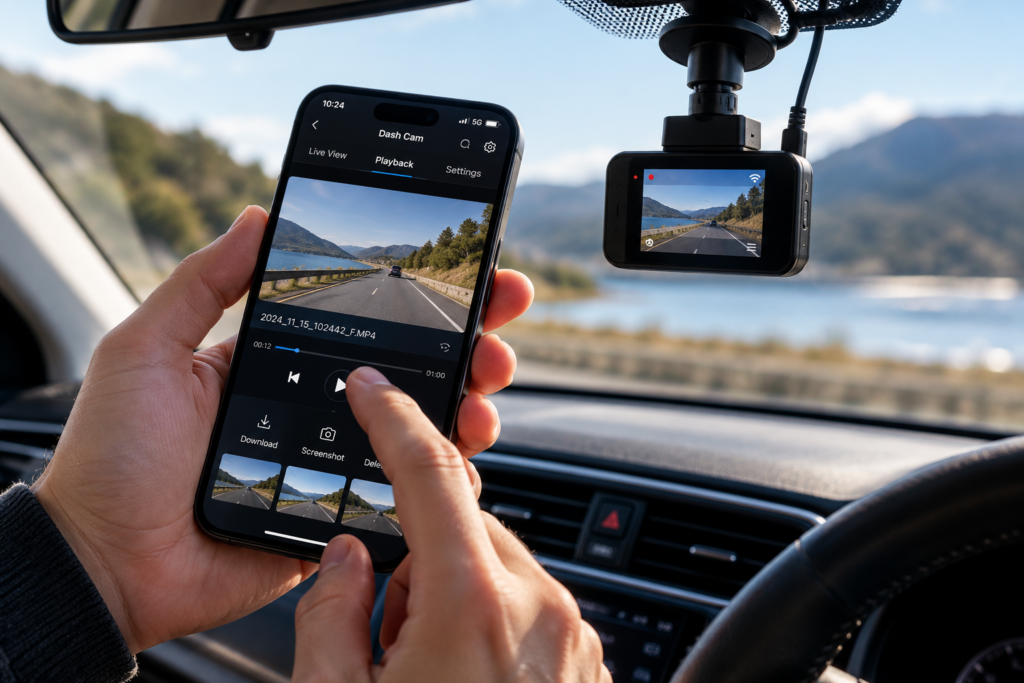
Most wireless dash cams still need a physical power connection. Built-in WiFi allows them to communicate with your smartphone, but it doesn’t mean they can operate indefinitely without cables or a power source.
That’s not necessarily a bad thing. A WiFi dash cam can be convenient, especially when you need to retrieve footage after an incident without removing the memory card.
But if you’re buying one because you want a completely cable-free installation, it’s worth knowing exactly what you’re getting.
In this guide, we’ll explain how wireless and WiFi dash cams work, whether they need an internet connection, how they’re powered and what to check before buying one in the UK.
If you’re comparing dash cams more generally, our Dash Cam Buying Guide UK covers recording quality, parking protection, GPS, night vision and other features worth considering.
What Is a Wireless Dash Cam?
A wireless dash cam is usually a car camera with built-in wireless connectivity, most commonly WiFi and sometimes Bluetooth.
Instead of removing the camera’s memory card or connecting the device to a computer, you can use a compatible smartphone app to access certain features.
Depending on the camera, this may include viewing recordings, downloading videos, changing settings or checking the camera’s live view.
However, there are three separate questions that often get mixed together:
- Wireless connectivity: Can the dash cam communicate with your phone without a data cable?
- Wireless power: Can the camera operate without being physically connected to a power source?
- Remote access: Can you view the camera when you’re away from your vehicle?
These are not the same features, and a camera offering one doesn’t automatically provide the others.
Understanding that difference can save you from buying a camera that doesn’t work the way you expected.
1. Does a Wireless Dash Cam Really Work Without Wires?
Usually, no. At least not in the completely cable-free way many people imagine.
Most dash cams are designed to record continuously while you’re driving. That requires a dependable supply of electricity.
The camera generally receives power through a vehicle’s 12V accessory socket, a compatible USB connection or a hardwire kit connected to the vehicle’s electrical system.
Built-in WiFi handles communication between the camera and your phone. It doesn’t power the device.
| Feature | What It Actually Means |
|---|---|
| WiFi Dash Cam | Can communicate wirelessly with a compatible phone or network |
| Bluetooth Dash Cam | Uses Bluetooth for supported functions such as pairing or device communication |
| Battery-Powered Camera | Can operate from a battery for a limited period |
| Hardwired Dash Cam | Receives power through a compatible connection to the vehicle electrical system |
| Cloud-Connected Dash Cam | May provide remote features using suitable internet connectivity |
Some cameras have a small built-in rechargeable battery, but that doesn’t necessarily make them suitable for recording an entire journey without external power.
In many models, the internal battery is mainly intended to support safe shutdown or short periods of operation.
Other cameras use a supercapacitor rather than a conventional battery. A supercapacitor can help the camera save its final recording when external power disappears, but it isn’t designed to provide hours of continuous recording.
Bottom line: If you want a dash cam that records reliably throughout your journey, expect to provide a suitable power connection, even if the product is advertised as wireless.
2. How Does a WiFi Dash Cam Connect to Your Phone?
Most WiFi dash cams create a local wireless connection that your smartphone can join.
Think of it as a private connection between the camera and your phone rather than a connection to the wider internet.
Depending on the manufacturer, the process may look something like this:
- Install the manufacturer’s compatible app on your smartphone.
- Switch on the dash cam and enable its WiFi function if required.
- Open the app and follow the pairing instructions.
- Connect your phone to the camera’s wireless network when prompted.
- Access supported recordings, settings or live-view features.
Some systems use Bluetooth to help establish the initial connection and WiFi to transfer video files. Others rely mainly on WiFi.
And here’s something that often surprises people: you generally don’t need your home WiFi or mobile data to connect directly to a dash cam’s local WiFi network.
The camera and smartphone can communicate directly, provided you’re within the supported wireless range.
Of course, if you then want to send a downloaded video through email or upload it to cloud storage, you’ll need an internet connection for that separate task.
3. What Can You Actually Do With a WiFi Dash Cam?
WiFi isn’t essential for recording your journey, but it can make using a dash cam considerably more convenient.
Exactly what you can do depends on the camera and its app.
Watch Recordings on Your Smartphone
Instead of removing the microSD card and finding a computer, you may be able to browse recorded clips directly through the manufacturer’s app.
This can be useful if you’ve witnessed a road incident and want to check whether your camera captured it.
However, not every app works equally well, and high-resolution videos can take time to load or transfer.
Download Footage Without Removing the Memory Card
Imagine you’ve been involved in a minor collision and need to preserve the recording.
With a compatible WiFi dash cam, you can potentially download the relevant clip directly to your smartphone.
That may be much simpler than removing a tiny memory card while sitting in a car park, hoping it doesn’t disappear somewhere between the seat and the centre console.
Once saved to your phone, footage may be easier to back up or share when appropriate.
Change Camera Settings
Some dash cams allow you to adjust settings through their smartphone app.
These may include recording resolution, audio recording, G-sensor sensitivity or parking mode options.
App-based controls can be particularly helpful on compact cameras that don’t have a built-in display.
See a Live Preview
A local live-view function can help you position the dash cam correctly, check what the lens can see and avoid accidentally pointing the camera at more dashboard than road.
Importantly, local live view is different from remote viewing over the internet.
Update Camera Firmware
Some models support firmware updates through their app, although the exact process and internet requirements vary.
Firmware updates may address bugs, compatibility issues or recording behaviour, so it’s worth checking the manufacturer’s instructions periodically.
4. Does a WiFi Dash Cam Need an Internet Connection?
No, a typical WiFi dash cam doesn’t need internet access to record video or connect locally to a compatible smartphone.
This is probably one of the most misunderstood features of wireless car cameras.
WiFi is a method of wireless communication. Internet access is a separate service.
Your dash cam can establish a WiFi connection directly with your phone, even if you’re parked somewhere without mobile reception.
That local connection may allow you to review or download recordings without the camera accessing the internet.
However, certain functions do need internet connectivity, such as:
- Uploading footage to online storage.
- Sharing a recording through an online service.
- Downloading app or firmware updates from the internet.
- Using supported remote monitoring services.
- Receiving certain cloud-based notifications.
If your phone displays a message saying the dash cam WiFi network has no internet connection, that doesn’t necessarily mean something is wrong.
It may simply mean you’ve connected to the camera’s local network, which isn’t designed to provide internet access.
5. Can You Watch a Wireless Dash Cam From Anywhere?
Not automatically.
It’s easy to see the words “WiFi”, “smart app” and “live view” in a product description and imagine checking your parked car from the sofa.
Unfortunately, a normal local WiFi connection doesn’t work like that.
Most standard WiFi dash cams require your smartphone to be close enough to connect directly to the camera.
If you’re at home and your car is parked several streets away, you generally won’t be able to connect using that local WiFi feature.
What About Cloud-Connected Dash Cams?
Some more advanced dash cams offer remote monitoring through an internet connection.
Depending on the model, they may use:
- A compatible vehicle WiFi hotspot with internet access.
- An external mobile internet connection.
- Built-in 4G or LTE connectivity.
- A manufacturer’s cloud platform and compatible smartphone app.
Some remote services also require a paid subscription.
These systems may support live viewing, location information, incident alerts or cloud storage, but features vary considerably between manufacturers.
They also need appropriate power and network coverage. A camera can’t provide remote footage if it has shut down or cannot connect to the required service.
If remote viewing is important to you, look specifically for cloud connectivity or remote live view support, not just the words “WiFi dash cam”.
6. How Do You Power a Wireless Dash Cam?
Since most wireless dash cams still need electricity, let’s look at the practical options.
Using the 12V Accessory Socket
This is one of the simplest installation methods.
The camera connects to the vehicle’s accessory socket through a suitable power adapter.
In many vehicles, the socket receives power when the ignition is switched on and stops supplying power when the vehicle is parked.
That means the camera can start and stop automatically with the car.
The downside is the visible cable, although careful routing can make it much less noticeable.
Using a USB Power Connection
Some dash cams can operate from a suitable USB power supply.
However, not every USB socket provides the required voltage, current or power behaviour for every camera.
USB-C is also a connector type, not a guarantee of compatibility.
Always check the camera’s power requirements rather than assuming that any available USB socket will work.
Using a Hardwire Kit
Hardwiring provides a more permanent connection to the vehicle’s electrical system.
It can help create a tidy installation because the cable can be concealed around the vehicle trim.
Compatible hardwire kits can also support certain parking surveillance features when the ignition is switched off.
However, correct installation matters. Vehicle wiring, fuses and airbag locations vary, so professional fitting is advisable if you’re not familiar with automotive electrics.
Using an External Battery Pack
Certain dedicated dash cam battery packs can supply power when the engine is switched off.
These can be useful for parking surveillance, although recording duration depends on battery capacity, the camera’s power consumption and its recording settings.
An external battery doesn’t necessarily eliminate wiring. It simply provides another source of power.
If you’d prefer not to connect your camera directly to the fuse box, see our Dash Cam Without Hardwiring: How Can You Power It? guide for a closer look at the alternatives.
7. Can You Install a Dash Cam Without Visible Cables?
Yes. Even though most dash cams need a cable, it doesn’t have to hang down the middle of the windscreen.
With suitable installation, a power cable can often be routed neatly around parts of the vehicle interior.
For example, it may be possible to position a compact dash cam behind or close to the rear-view mirror and route the cable towards the relevant power connection.
That can make the installation much less noticeable from the driver’s seat.
However, cable routing must not interfere with the driver’s view, vehicle controls or safety equipment.
What About Airbags?
Modern vehicles often have curtain airbags along the roofline and pillars.
Routing cables incorrectly across an airbag deployment path can create a safety risk.
Never assume that pushing a cable behind any piece of trim is safe. Consult vehicle-specific guidance or use a qualified installer.
Where Should a Dash Cam Be Mounted?
The camera should have a suitable view of the road without obstructing the driver’s vision.
For many vehicles, an area near the rear-view mirror is a practical location, provided the installation complies with applicable requirements and does not interfere with vehicle equipment.
Check the camera’s field of view after mounting it. The aim is to record the road, not the bonnet, dashboard or a large portion of the vehicle interior.
8. Are Wireless Front and Rear Dash Cams Really Wireless?
This is another area where product descriptions can be confusing.
A wireless front and rear dash cam may simply be a dual-camera system where the main camera has WiFi connectivity.
In many conventional systems, the rear camera still connects to the front unit using a physical cable.
The WiFi feature is used for smartphone communication, while the rear camera cable transfers video or other signals between the camera units.
So if you want a front and rear setup without running a cable through the car, don’t assume a model advertised as wireless will meet that requirement.
Check whether:
- The rear camera connects using a cable.
- Both cameras need separate power connections.
- The system supports simultaneous front and rear recording.
- The rear camera is included or sold separately.
- Footage from both cameras is available through the smartphone app.
Some specialised wireless multi-camera arrangements exist, but their power requirements, recording behaviour and compatibility need to be checked individually.
For help deciding whether two cameras are worth it, read our Front vs Front and Rear Dash Cam comparison.
9. Do Wireless Dash Cams Record When the Car Is Off?
They can, but WiFi has very little to do with whether parking recording works.
A dash cam’s ability to record while parked depends mainly on its parking mode features and available power.
Some cameras monitor impacts, others detect movement, and certain models offer time-lapse or continuous low-bitrate parking recording.
However, these functions may require a compatible hardwire kit, an always-powered connection or a dedicated battery system.
A camera can have excellent WiFi connectivity and still switch off completely when you stop the engine.
Likewise, a camera without WiFi may offer useful parking recording if it supports the correct power arrangement.
It’s important not to confuse wireless connectivity with parking surveillance.
For a detailed explanation, read Do Dash Cams Record When the Car Is Off? Parking Mode Explained.
10. WiFi Dash Cam vs Non-WiFi Dash Cam: Which Is Better?
Not everyone needs WiFi. In fact, if you only want a camera that starts recording when you drive and saves footage to a memory card, a model without wireless connectivity may do the job perfectly well.
But WiFi becomes more appealing if you regularly want to review recordings or adjust settings without removing the camera or microSD card.
| Feature | WiFi Dash Cam | Non-WiFi Dash Cam |
|---|---|---|
| Records driving footage | Yes | Yes |
| Local smartphone connection | Usually, with a compatible app | Generally not via WiFi |
| Download footage to phone | Often supported | May require card reader or another method |
| Needs external power | Usually | Usually |
| Remote internet viewing | Only on supported connected systems | Generally unavailable |
| Parking mode | Depends on model | Depends on model |
| Video quality | Depends on camera hardware | Depends on camera hardware |
Notice that WiFi doesn’t automatically improve recording quality.
A good non-WiFi dash cam may record clearer video than a poorly designed WiFi model.
For that reason, prioritise image quality, reliable recording and suitable power options before treating connectivity as a deciding factor.
11. Does WiFi Affect Dash Cam Video Quality?
Not directly.
The quality of your recorded footage depends on factors such as resolution, image sensor, lens, exposure, frame rate and compression.
WiFi mainly determines how compatible devices communicate.
Some dash cams record high-resolution video but use lower-resolution preview files to make viewing or transferring footage through an app more manageable.
This means a clip viewed inside an app might not always represent the full quality of the original recording.
Before judging a camera’s image quality, check whether you’re viewing the full-resolution file or a lower-resolution preview.
And don’t assume that buying a 4K WiFi dash cam automatically guarantees readable number plates in every situation.
Lighting, movement and sensor performance remain important.
Our 1080p vs 2K vs 4K Dash Cams guide explains what those resolution numbers actually mean.
12. Why Won’t My Dash Cam Connect to My Phone?
You’ve installed the app, enabled WiFi and tapped Connect. Nothing happens.
Before deciding that the camera is faulty, there are several common issues worth checking.
The Camera’s WiFi Is Switched Off
Some dash cams require WiFi to be enabled manually through a button or menu setting.
Your Phone Is Connected to the Wrong Network
Check that your smartphone is connected to the camera’s network rather than another nearby WiFi network.
Your Phone Reports No Internet
That’s not always a problem. A local dash cam WiFi network may not provide internet access, and your phone may warn you about it.
The App Doesn’t Have the Required Permissions
Depending on your phone and the app, Bluetooth, local network or location-related permissions may be required for device discovery or pairing.
The Phone Is Too Far Away
Local WiFi connections have a limited range. Vehicle bodywork and surrounding obstacles can also affect the connection.
Another Device Is Already Connected
Some dash cams restrict simultaneous connections, meaning an existing paired device may interfere with a new connection.
The App or Firmware Needs Updating
Compatibility problems can sometimes be resolved through the manufacturer’s supported update process.
If you’re still having trouble, follow the camera manufacturer’s pairing instructions. Resetting everything should generally be a last step, especially if you have recordings or settings you want to preserve.
13. Do WiFi Dash Cams Need a Memory Card?
Most standard WiFi dash cams still use a microSD card to store video recordings.
WiFi allows compatible recordings to be accessed wirelessly, but it doesn’t automatically replace local storage.
Certain cloud-connected cameras may offer additional online storage, although the features and subscription arrangements vary.
For ordinary loop recording, a suitable microSD card is often essential.
Look for a card that meets the manufacturer’s capacity and speed requirements. A high-endurance card designed for continuous video recording is often a sensible choice.
This becomes particularly important with high-resolution cameras or systems recording from multiple cameras at once.
Our Dash Cam SD Card guide explains which specifications matter and what to check before purchasing.
14. How Secure Are WiFi Dash Cams?
Since a WiFi dash cam creates a wireless connection, it’s sensible to think about security as well as convenience.
Security features and risks vary between manufacturers, but there are a few practical precautions worth taking.
- Use a strong camera WiFi password where the device allows it.
- Change default credentials when the manufacturer supports doing so.
- Keep the camera app and firmware reasonably up to date.
- Use the manufacturer’s official app or trusted download sources.
- Review what permissions the app requests.
- Understand how cloud features store or share footage before enabling them.
A local WiFi connection doesn’t automatically mean your camera is uploading every journey to the internet.
Equally, using a cloud-connected system may involve additional privacy considerations.
If you regularly share footage with other people, consider whether it contains identifiable individuals, vehicle registration numbers or private conversations.
15. What Should You Look for When Buying a Wireless Dash Cam?
The word “wireless” shouldn’t be the deciding factor on its own.
Before buying, think about what you actually want the camera to do.
| Your Priority | What to Check |
|---|---|
| Viewing videos on your phone | Built-in WiFi and compatible app |
| Minimal visible wiring | Compact design and suitable cable-routing options |
| Monitoring from home | Genuine remote access, internet connectivity and any subscription requirements |
| Recording when parked | Parking mode and compatible constant power |
| Front and rear coverage | Dual-channel support and rear camera connection method |
| Clearer footage | Sensor quality, resolution and real sample recordings |
| Quick access to recordings | App usability and video transfer features |
| Longer recording history | Supported memory card capacity and recording bit rate |
If all you want is a tidy installation and reliable journey recording, you may not need cloud access or advanced wireless features at all.
If you often review footage on your phone, WiFi connectivity can be genuinely useful.
And if you want to monitor your vehicle from another location, make sure the chosen camera offers the appropriate remote service rather than just local smartphone connectivity.
You can browse WiFi and other dash cams at PYC Online to compare available recording features and camera configurations.
Frequently Asked Questions About Wireless Dash Cams
Are wireless dash cams completely wireless?
Usually not. Most wireless dash cams use WiFi for communication but still require a power cable. The word “wireless” generally describes the data connection rather than the power supply.
Can a dash cam work without a power cable?
Some cameras can operate briefly using an internal battery, but most conventional dash cams need external power for reliable continuous recording. Dedicated external battery systems can support compatible cameras for longer periods.
Does a WiFi dash cam need internet access?
No. Most WiFi dash cams can connect directly to a compatible smartphone without internet access. Cloud storage, online sharing and remote monitoring may require an internet connection.
Can I watch my WiFi dash cam from my house?
Only if the camera and connection support the required access. Standard local WiFi dash cams generally require you to be nearby. Remote viewing from another location usually requires suitable internet connectivity and a supported remote service.
Do wireless dash cams automatically upload recordings?
Not necessarily. Many WiFi dash cams store footage on a local memory card and use WiFi only for accessing it through a smartphone. Automatic cloud uploads are separate features available on certain connected models.
Can a wireless dash cam connect to an iPhone or Android phone?
Many can, provided the manufacturer’s app supports your device and operating system. Always check compatibility before buying.
Do WiFi dash cams record without a phone connected?
Yes. Most WiFi dash cams can record independently while powered and correctly configured. A smartphone connection is generally used for supported settings, live previews or retrieving recordings rather than for normal recording itself.
Are WiFi dash cams better than ordinary dash cams?
They’re more convenient for accessing recordings, but WiFi doesn’t automatically improve video quality or reliability. The best choice depends on which features you actually need.
Can a wireless dash cam record when the engine is off?
Some can, but this depends on parking mode support and the power arrangement, not simply WiFi connectivity. A compatible hardwire kit, external battery or manufacturer-approved alternative may be required.
Are wireless front and rear dash cams available?
Yes, products are advertised this way, but many still use a physical cable between the front and rear cameras. Always check whether the term wireless refers to smartphone connectivity or communication between camera units.
Can I use a WiFi dash cam without a subscription?
Many standard WiFi dash cams offer local smartphone connectivity without an ongoing subscription. Certain cloud storage, LTE connectivity and remote monitoring features may involve paid plans.
Why does my phone say my dash cam WiFi has no internet?
Because the camera’s WiFi network may be intended only for direct communication between the dash cam and your phone. Not providing internet access is normal for many local WiFi camera connections.
Explore More Dash Cam Buying Guides
Wireless connectivity is useful, but it’s only one part of choosing a suitable dash cam. If you’re still comparing features, our other guides explain the questions worth asking before you buy.
- Dash Cam Buying Guide UK: How to Choose the Right Dash Cam
- Front vs Front and Rear Dash Cam: Is a Rear Camera Worth It?
- Do Dash Cams Record When the Car Is Off? Parking Mode Explained
- 1080p vs 2K vs 4K Dash Cams: Is 4K Really Worth It?
- Dash Cam Without Hardwiring: How Can You Power It?
- Dash Cam for Parking Protection: What Features Do You Need?
- What SD Card Do You Need for a Dash Cam?
- Are Dash Cams Legal in the UK and Europe? Rules for Driving Abroad
Final Thoughts: Is a Wireless Dash Cam Worth Buying?
A wireless dash cam can be a useful upgrade, particularly if you want to access recordings on your phone without removing the memory card every time.
But let’s be clear about what you’re paying for.
WiFi gives you wireless communication. It doesn’t automatically eliminate power cables, provide remote internet access or improve video quality.
For most drivers, reliable recording, good image quality and straightforward installation should come first. WiFi is a convenience worth having if you’ll actually use it.
And if your main reason for searching for a wireless dash cam is that you can’t stand the thought of another cable hanging across the dashboard, a neatly installed conventional camera may solve that problem just as well.
Sometimes the simplest solution is still the best one.
Looking for a dash cam with WiFi, GPS or front and rear recording? Explore the PYC Online Dashcam collection to compare available models and features.
For more practical guides to choosing and using car technology, visit our Knowledge Hub.
Leave a comment